The LANSA Composer Server Setup wizard asks you to choose the website in which you wish to define the virtual folders used with LANSA Composer's web features.
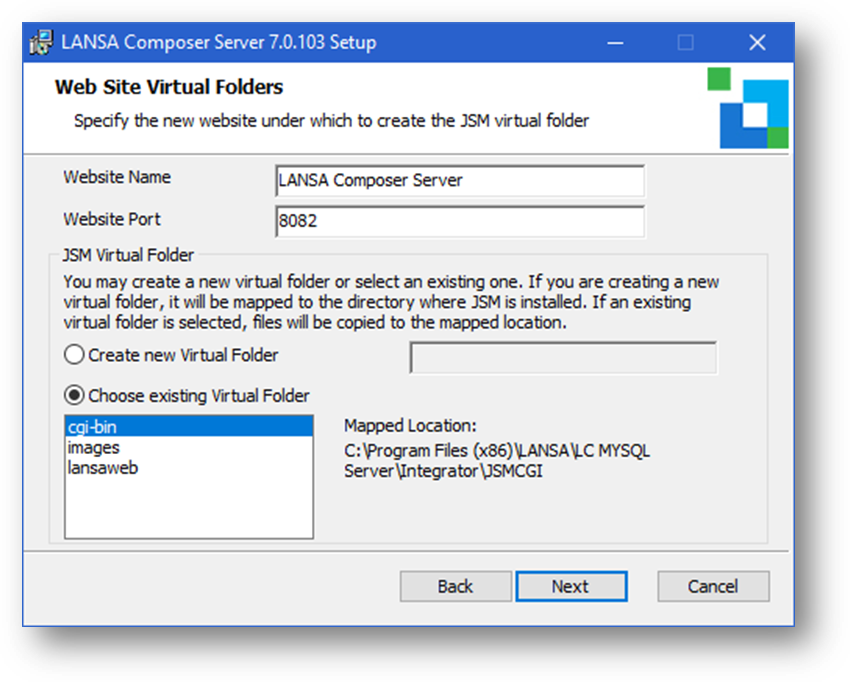
Website name is the name that will be used to create a website in IIS.
Web Port determines the binding IIS will use for the website that will be created.
A virtual folder (in this context) is a means of instructing Microsoft Internet Information Services (IIS) to re-direct a component of the URL used for an incoming web request (the "virtual" folder) to a physical folder location, possibly outside the Microsoft IIS folder tree.
In particular, the LANSA Composer Server Setup defines two virtual folders:
- The Images folder identifies the location of web images used in LANSA Composer's Management Console web application. It is always called Images – you have no control over the virtual folder name. The virtual folder will be configured to re-direct image requests to the appropriate folder in the LANSA Composer Server installed location, for example, to:
C:\Program Files\LANSA\LANSA Composer Server\WebServer\Images
- The JSM folder identifies the location of the LANSA Integrator JSM Direct support that is used to direct inbound HTTP requests through LANSA Composer. The LANSA Composer Server Setup permits you to choose the virtual folder name. If you create a new virtual folder, it will be mapped to the directory where the JSM Direct support is installed, for example, to:
C:\Program Files\LANSA\LANSA Composer Server\Integrator\JSMCGI
In this step of the LANSA Composer Server Setup wizard, you can control the creation of the necessary virtual folders in two respects, as follows:
Website
Of the websites chosen in the previous step, this specifies which is to contain the Images and JSM virtual folders.
Usually, you will have chosen not more than one website in the previous step - its name will be shown and selected here and you need make no further change.
JSM Virtual Folder
This allows you to specify the name of a new virtual folder (default cgi-bin) or to choose an existing virtual folder that is used with the LANSA Integrator JSM Direct support.
In both cases the related LANSA Integrator files (jsmdirect.exe, jsmproxy.exe, jsmadmin.exe and their associated data, message and configuration files) will be installed in the JSMCGI folder under the LANSA Composer root directory.
If you select an existing virtual folder, the related Integrator files (jsmdirect.exe, jsmproxy.exe, jsmadmin.exe and their associated data, message and configuration files) will then be copied into the physical folder the chosen virtual folder is mapped to.
When you have completed your choices, click Next and continue with: