Objectives
To use the sort facilities to create two queries:
- A Top-10 query listing the highest Annual Salary values. A list of the 10 records with the highest Annual Salaries in descending sequence (highest to lowest) within department.
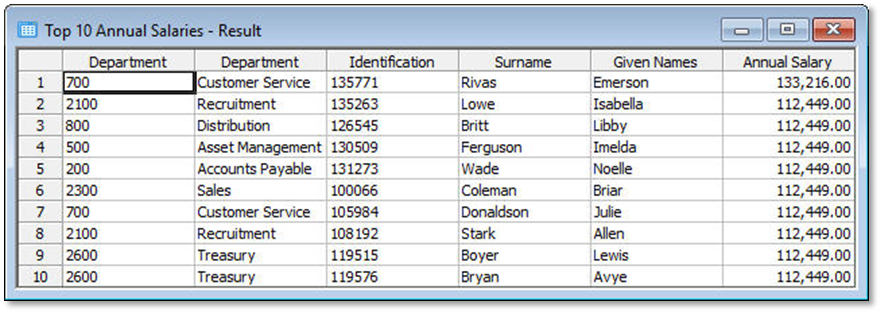
- A Bottom-10 query with the lowest Annual Salary values. A list of the 10 records with the lowest Annual Salaries in ascending sequence (lowest to highest) within department.
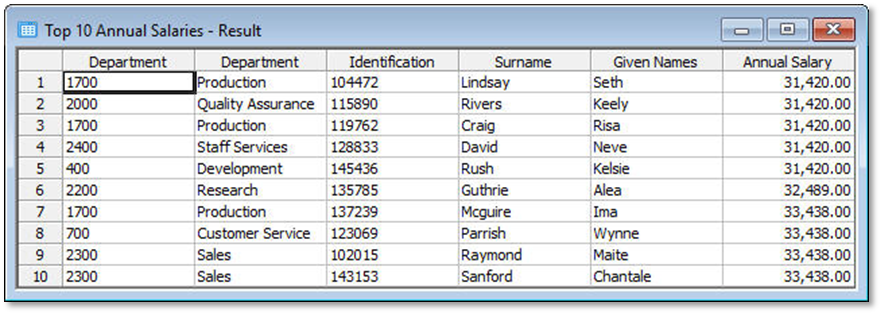
To achieve these objectives you will complete the following:
Top-10 query
Step 1. Build a query over the Employee file
Step 2. Limit the results to the first 10 records
Step 3. Sort the data (in descending order)
Step 5. Save the query definition
Bottom-10 query
Step 6. Sort the data (in ascending order)
Step 8. Close the Query and Result windows
Before You Begin
You may wish to review the following topic in this guide: