Following is an example to explain the concept of ActiveX Error trapping. Copy and paste the code into a RDMLX enabled form, compile and run it.
To gain an understanding of the concept, follow the comments within the supplied code.
How to set it up:
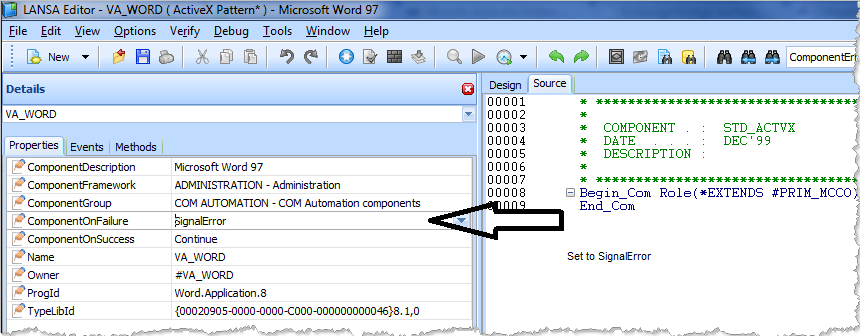
- Set the ActiveX ComponentOnFailure Property.
- Trap error in code.
- Set the ActiveX ComponentOnFailure property to "SignalError".
*Trap error in codeFunction Options(*DIRECT)Begin_Com Role(*EXTENDS #PRIM_FORM) Clientheight(376) Clientwidth(208) Height(414) Left(295) Top(178) Width(224) Define_Com Class(#PRIM_PHBN) Name(#StartWord) Caption('Start Word') Displayposition(1) Left(8) Parent(#COM_OWNER) Tabposition(1) Top(8) Width(193) Define_Com Class(#PRIM_PHBN) Name(#CreateDocument) Caption('Create Document') Displayposition(2) Left(8) Parent(#COM_OWNER) Tabposition(2) Top(40) Width(193) Define_Com Class(#PRIM_PHBN) Name(#FindBookmark) Caption('Access Bookmark') Displayposition(3) Left(8) Parent(#COM_OWNER) Tabposition(3) Top(72) Width(193) Define_Com Class(#va_word.Application) Name(#Word) Reference(*dynamic)Define_Com Class(#va_word.Document) Name(#ActiveDocument) Reference(*dynamic)Define_Com Class(#va_word.Bookmarks) Name(#Bookmarks) Reference(*dynamic) Evtroutine Handling(#StartWord.Click)* Start an instance of wordSet_Ref Com(#Word) To(*Create_as #va_word) Endroutine Evtroutine Handling(#CreateDocument.Click) If (#Word *IsNot *null) If (#ActiveDocument *Is *null)* Open a new document#ActiveDocument <= #Word.Documents.Add* Get the reference to the Bookmarks of the Active Document
* This is necessary to be able to listen to the activeX errors#Bookmarks <= #ActiveDocument.Bookmarks Else Use Builtin(ov_message_box) With_Args("Document Aleady Exists") Endif Else Use Builtin(ov_message_box) With_Args("Word Has Not Yet been Started") Endif Endroutine Evtroutine Handling(#FindBookmark.Click) Define_Com Class(#va_word.Bookmark) Name(#Bookmark) Reference(*dynamic)* Ensure there is an Active DocumentIf (#ActiveDocument *IsNot *null)* Try to access a bookmark
* As this is a new document there will be no bookmarks* This will generate an ActiveX error on Bookmarks ONLY #Bookmark <= #Bookmarks<1> Else Use Builtin(Ov_message_box) With_Args("There Is No Active Document") Endif Endroutine Evtroutine Handling(#Word.ComponentError)* This routine will never fire. The bookmark error is specific to the Bookmark instance Use Builtin(Message_Box_Add) With_Args("Error on Word")Use Builtin(Message_Box_Add) With_Args(#Com_err_info.ErrorWord) Use Builtin(Message_Box_Show) Endroutine Evtroutine Handling(#Bookmarks.ComponentError) Use Builtin(Message_Box_Add) With_Args("Error on Bookmarks")Use Builtin(Message_Box_Add) With_Args(#Com_err_info.ErrorWord) Use Builtin(Message_Box_Show) Endroutine Evtroutine Handling(#Com_Owner.Closing)* Drop all references and ensure Word quits correctly#Word.Documents.Close If (#Word *IsNot *null) #Word.Quit Endif Endroutine End_Com
Background notes
To handle runtime errors in LANSA, you need to understand the difference between LANSA generated errors and errors generated by ActiveX controls.
Consider the following code sample:
Function Options(*DIRECT)Begin_Com Role(*EXTENDS #PRIM_FORM) Clientheight(313) Clientwidth(492)Define_Com Class(#PRIM_STBR) Name(#STBR_1) Displayposition(1) Height(24) Left(0) Messageposition(1) Parent(#COM_OWNER) Tabposition(1) Tabstop(False) Top(278) Width(484)Define_Com Class(#VA_WORD.Application) Name(#VA_WORD)Evtroutine Handling(#com_owner.Initialize)Message Msgtxt("Throwing ActiveX error")#VA_WORD.ComponentOnFailure := SignalErrorIf (#VA_WORD.ActiveDocument.Bookmarks.Exists( " ERROR" ))EndifEndroutineEvtroutine Handling(#VA_WORD.ComponentError) Options(*NOCLEARMESSAGES *NOCLEARERRORS)Message Msgtxt(("Catching ActiveX error").BlankConcat( #COM_ERR_INFO.ErrorCode.AsString ))#COM_ERR_INFO.ClearEndroutineEnd_Com
In the above example, the initialize event references Word.ActiveDocument.Bookmarks. However, if there is no ActiveDocument, that is, you have neither explicitly created nor opened a document, the ActiveDocument reference in Word will be null. This means that the moment the Visual LANSA runtime attempts to access the ActiveDocument property of Word, there will be a LANSA generated runtime error reporting that Word.ActiveDocument is Null.
Had the initialize event been as follows, no such error would occur.
* Add a new (active) document.#VA_Word.AddIf (#VA_word.ActiveDocument.Bookmarks.Exists("Etc")etc.
It is therefore the responsibility of the developer to ensure that before trying to access a feature that references another instance, that suitably defensive code is included.
If (#Word.ActiveDocument *isnot *null)If (#VA_word.ActiveDocument.Bookmarks.Exists("Error")etc.elseUse OV_message_box ("There is no Active Document")Endif
Even though this code now avoids the LANSA generated runtime error, you still can't detect an ActiveX error by listening to VA_WORD because the ActiveX error for a missing bookmark belongs to the Bookmarks feature. Therefore, you need to set up specific references in the code.
Define_Com Class(#va_word.Application) Name(#Word) Reference(*dynamic)Define_Com Class(#va_word.Document) Name(#ActiveDocument) Reference(*dynamic)Define_Com Class(#va_word.Bookmarks) Name(#Bookmarks) Reference(*dynamic)Evtroutine #Com_owner.CreateInstance* Start WordSet_Ref Com(#Word) To(*Create_as #va_word)* Create a new document and store the reference#ActiveDocument <= #Word.Documents.Add#Bookmarks <= #ActiveDocument.Bookmarks Endroutine
When you now attempt to access a bookmark that doesn't exist, the error generated by Word can be detected as follows:
Evtroutine Handling(#Bookmarks.ComponentError)Use Builtin(Message_Box_Add) With_Args("Error on Bookmarks")Use Builtin(Message_Box_Add) With_Args(#Com_err_info.ErrorWord)Use Builtin(Message_Box_Show)Endroutine