最初に、以下のファンクションを SHARED スクリプト・オブジェクトの一部として uf_sy420_rts.js ファイルに追加します。
var SHARED =
{

   /* ------------------------------------------------- */
   /* Apply standard layout changes to arriving screens */
   /* ------------------------------------------------- */

   ApplyStandardLayout : function()
   {

      /* Use the HTMLAPI to hide lines 1 and 2 on all screens */

      HTMLAPI.hideRow(1);
      HTMLAPI.hideRow(2);

   },
など
これで、RAMP 画面の到着スクリプトから呼び出すことができる、SHARED,ApplyStandardLayout という標準ファンクションができました。
例えば、サンプルのデスティネーション画面の到着スクリプトを以下のように変更して、スクリプトが 5250 画面を表示する直前にこの新しいファンクションを使用します。
   vHandle_ARRIVE: function(oPayload, oPreviousForm)
   {
     /* If the department input field exists on the screen, display it */

     if ( CHECK_FIELD_EXISTS("DEPTMENT") )
     {

        SHARED.ApplyStandardLayout();

        SHOW_CURRENT_FORM(true);
        HIDE_5250_BUTTONS();
        SETCURSORTOFIELD("SURNAME");
        SETBUSY(false);
     }

     /* Otherwise send an F21 key to make the screen input capable  */

     else
     {
        SENDKEY(KeyF21);
     }

     /* <ARRIVE /> - Do not remove or alter this line */

     return(true);
   },
実行すると、結果の画面は以下のようになります。
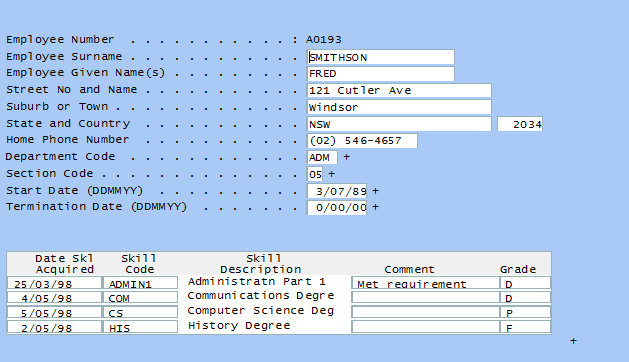
画面の行 1 と 2 が非表示になります。
これは非常に簡素なジェネリックなレイアウト規則ですが、その他の多くの 5250 画面に対して利用できるより重要なジェネリックな規則を実装できる基盤ができました。