Enter here the caption for this object. Caption is the visible name of the object.
How the caption is shown depends on the type of object:
- For an application, it is the text displayed for the application under its icon in the Application Bar.
- For a business object, it is the text displayed under its icon in the Business Object Bar.
- For a command, it is the name of the command displayed in menus and in the command tab.
- For a filter, it is the name of the filter displayed in the filter tab.
- For a language, it specifies the caption of the language.
- For a custom property, it specifies the caption to be associated with the custom property. This caption is shown to the administrator.
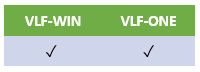
This property is in:
The Identification tab
The User Details tab
The Web/RAMP Details tab