Create a reusable part called FLDVIS01 using the source following. This is will provide autocompletion functionality for field DEPTMENT:
Function Options(*DIRECT)
Begin_Com Role(*EXTENDS #PRIM_PANL *implements #Prim_dc.iMonitorSubject) Defaultpty(Value) Displayposition(1) Height(20) Layoutmanager(#ATLM_1) Left(0) Tabposition(1) Top(0) Width(150)
Define_Com Class(#PRIM_ATLM) Name(#ATLM_1)
Define_Com Class(#DEPTMENT.VisualEdit) Name(#Department) Displayposition(1) Height(20) Marginleft(0) Parent(#COM_OWNER) Tabposition(1) Width(150)
Define_Com Class(#PRIM_ATLI) Name(#ATLI_1) Attachment(Center) Manage(#Department) Parent(#ATLM_1)
Define_Pty Name(Value) Get(GetPropertyValue) Set(SetPropertyValue)
Ptyroutine Name(GetPropertyValue)
Define_Map For(*Output) Class(#prim_alph) Name(#Property)
#Property := #Department
Endroutine
Ptyroutine Name(SetPropertyValue)
Define_Map For(*Input) Class(#prim_alph) Name(#Property)
#Department := #Property
Endroutine
Mthroutine Name(ApplymonitoredValue) Options(*redefine)
- No redefinition required
Endroutine
Mthroutine Name(GetValue) Options(*redefine) - No redefinition required
Endroutine
Evtroutine Handling(#Department.KeyPress) Handled(#Handled) Keycode(#KeyCode) Char(#Char) - If the field isn't full
If (#Department.CurSize <> #Department.FieldLength) - If a character entered
If (#KeyCode = isChar)
#Com_Owner.PrepareAutoComplete
If (#Com_owner.CanAutoComplete)
#Handled := True
#Com_owner.AutoComplete( #Char )
Signal Event(ValueChanged)
Endif
Endif
Endif
Endroutine
Evtroutine Handling(#Department.Changed) - Handle all other key presses that might affect the value
Signal Event(ValueChanged)
Endroutine
Mthroutine Name(CanAutoComplete) Help('Can we autocomplete?') Access(*Private)
Define_Map For(*Result) Class(#prim_boln) Name(#Result) - If selection doesn't start at the end of the value, autocomplete is not appropriate.
#Result := (#Department.SelectionEnd = (#Department.Trim.cursize + 1))
Endroutine
Mthroutine Name(AutoComplete) Access(*private)
Define_Map For(*Input) Class(#prim_alph) Name(#Char) Help('Character just pressed on the keyboard')
Define_Com Class(#prim_nmbr) Name(#Start)
Define_Com Class(#prim_alph) Name(#Candidate)
#Start := #Department.SelectionStart
#Candidate := #Com_owner.PrepareCandidate( #Char )
#Department := #Com_owner.GetCandidate( #Candidate ) - Set selection to be startposition + 1 to the end
#Department.SelectionStart := #Start + 1
#Department.SelectionEnd := #Department.Trim.cursize + 1
Endroutine
Mthroutine Name(PrepareAutoComplete) Help('Prepare Selection in the value so that it runs left to right') Access(*private)
Define_Com Class(#prim_nmbr) Name(#Transition) - If Start is greater than end, reverse the selection points
If (#Department.SelectionStart > #Department.SelectionEnd)
#Transition := #Department.SelectionStart
#Department.SelectionStart := #Department.SelectionEnd
#Department.SelectionEnd := #Transition
Endif
Endroutine
Mthroutine Name(PrepareCandidate) Help('Prepare the input value ready for looking up the next candidate') Access(*private)
Define_Map For(*Input) Class(#prim_alph) Name(#Char) Help('Character just pressed on the keyboard')
Define_Map For(*Result) Class(#Prim_alph) Name(#Result) - If selection is the whole word, only use the char supplied by the event
If (#Department.SelectionStart = 1)
#Result := #Char.uppercase
Else - Get anything to the left of the cursor start position and append the last key press
#Result := (#Department.substring( 1 (#Department.SelectionStart - 1) ).trim + #Char).Uppercase
Endif
Endroutine
Mthroutine Name(GetCandidate) Access(*private)
Define_Map For(*Input) Class(#prim_alph) Name(#Candidate)
Define_Map For(*Result) Class(#prim_alph) Name(#Result) - If no record found, the last value entered is still the right answer
#Result := #Candidate - Find the first record starting with the candidate value
Select Fields(#Deptment) From_File(Deptab) With_Key(#Candidate) Generic(*yes)
#Result := #Deptment
Leave
Endselect
Endroutine
End_Com
Note how the reusable part only displays a single input box for DEPTMENT. No labels or descriptions are required.
Open field DEPTMENT and turn to the visualization tab.
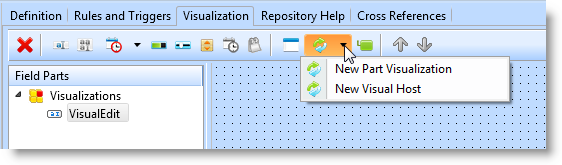
Select the option for New Visual Host and the choose FLDVIS01 from the prompt. DEPTMENT should now appear as follows:
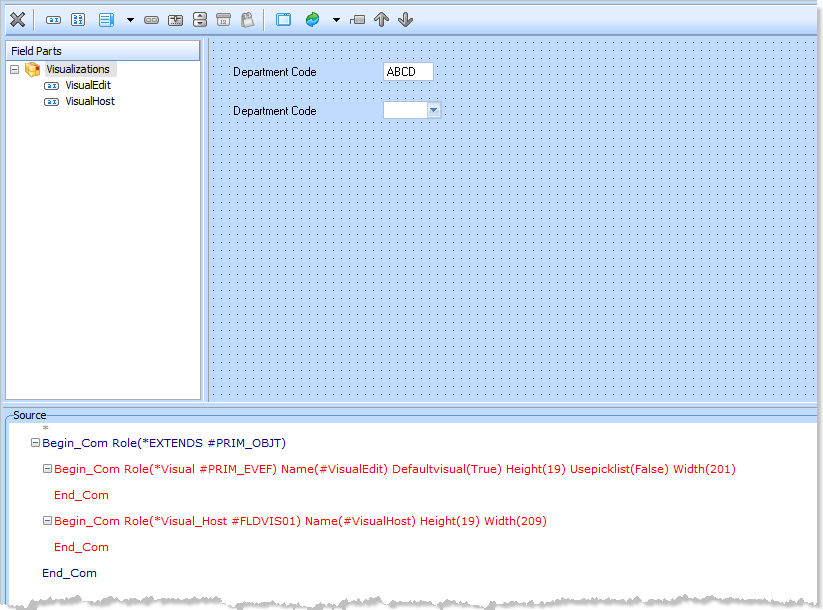
The new Visual_host reusable can now be used as follows:
Define_Com Class(#Deptment.Visualhost) Name(#...)
You might also consider changing the default name of VisualHost to AutoComplete or similar. This means when it's used on a form you'll see the following:
Define_Com Class(#Deptment.AutoComplete) Name(#...)
&<img src="../resources/images/opentoc-dark.png" title="Open Contents List" border="0"&>