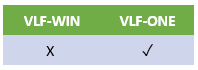
In this tutorial, you will deploy a VLF-ONE Framework from an IBM i server to another IBM i server.
To achieve this objective, you will complete the following steps:
- Step 1. Prepare for Deployment
- Step 2. Make Sure the Framework Definition File Has Been Created
- Step 3. Package Your Framework Server Objects
- Step 4. Add Framework Components
- Step 5. Add the Save Files to the Export
- Step 6. Add Files to the Export
- Step 7. Move the Deployment Material to the Target System
- Step 8. Import the Deployment Package
- Step 9. Restore Your Framework Objects
- Step 10. Restore the Framework Components
- Step 11. Execute the Deployed Application
- Summary
Before You Begin
Note that this tutorial is only an outline of steps and options to select to deploy the Framework and the tutorial application.
Your actual application might contain objects other than your filters, command handlers, etc., that must also be deployed.
In order to complete this tutorial, you must have created an application ready to be deployed.