This guide is here to help you quickly identify and resolve any common issues you might encounter. Simply browse the sections below to find a solution to your specific problem. If you can't find what you're looking for, contact our support team for additional help.
The SQL Server Instance must be online and ready for connections to correct this error. This happens for some of the following reasons:
ExecuteNonQuery requires an open and available connection
This issue typically occurs when SQL CM is unable to establish or maintain the necessary connection, hindering its functionality. Whether due to network restrictions, server instance unavailability, or configuration errors, understanding the underlying causes and solutions to this problem is essential for troubleshooting and restoring efficient communication.
The potential causes behind the disruption could be:
- SQL CM cannot connect to a SQL Server instance (repository or audited instance).
- To address this issue, verify the following:
- The repository SQL server is online
- The SQL Compliance Manager components (Collection Server and the Agents) are online
- The audited instances are online
- The user login credentials are correct
Error resolution: Network-related or instance-specific error occurred
The error message "Error resolution: Network-related or instance-specific error occurred" typically indicates issues with network connectivity or problems accessing a specific service instance, such as a database. Identifying and addressing the underlying cause is crucial to restoring proper functionality and connectivity.
- To resolve this issue, it is necessary to verify the following:
- Confirm that the SQL Compliance Manager components (Collection Server and the Agents) are online
- Inspect if the audited instances are online
- Check that the repository of the SQL server is online
Error loading configuration
The "Error loading configuration" message typically occurs when an application or system fails to load its configuration files properly. This can be due to missing, corrupted, or improperly formatted configuration data.
The potential causes behind the disruption could be:
- The SQL Compliance Manager Components (Collection Server and Agents) are offline
- The repository of the SQL server or the audited instance is offline
- Missing configuration files. Please verify your configuration files and save your settings
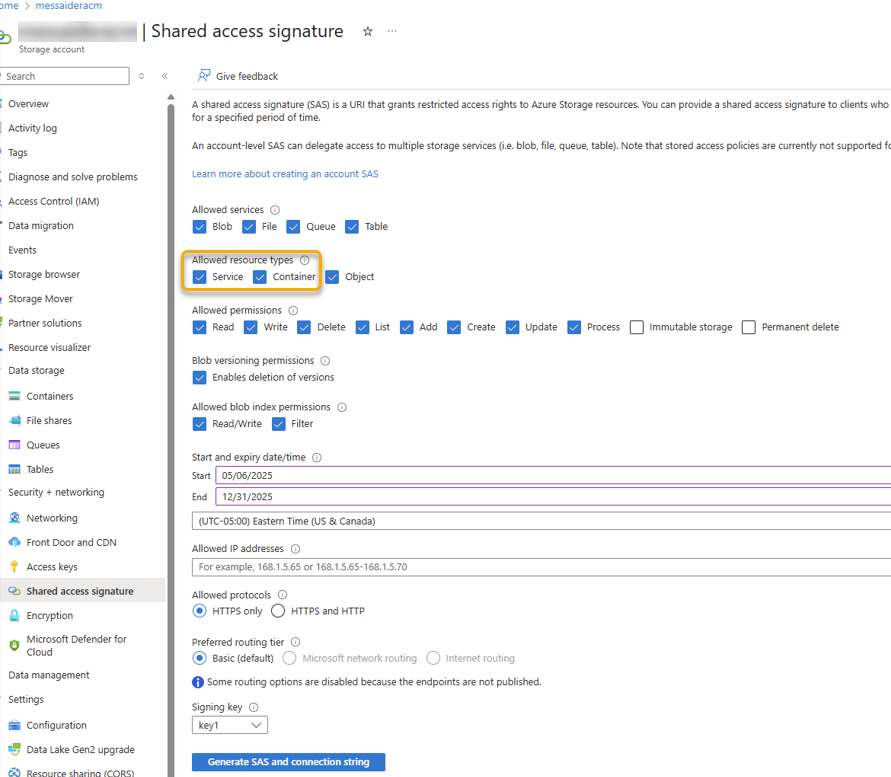
Access to blob storage is forbidden
This error occurs when the system attempts to access a blob storage resource without the necessary permissions, resulting in a forbidden response from the storage service.
- To resolve this issue:
- Ensure the Allowed resource types have both Service and Container checkmarked.