In this step, you will change the Employees filter to listen for the EMPLOYEE_CHANGED event.
- Locate and open the Employees filter iiiCOM04.
- Display the Source tab.
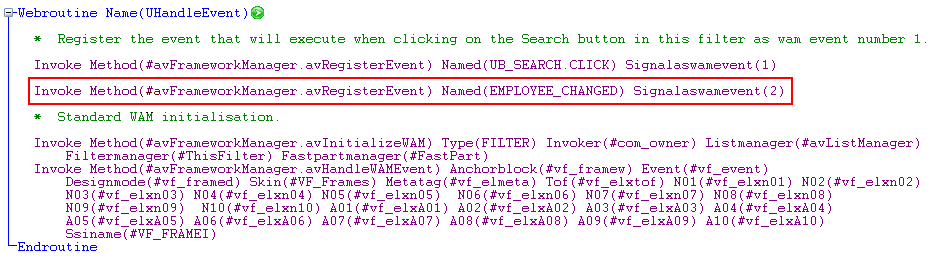
- Register the EMPLOYEE_CHANGED event in the UHandleEvent webroutine:
Invoke Method(#avFrameworkManager.avRegisterEvent) Named(EMPLOYEE_CHANGED) Signalaswamevent(2)
The UHandleEvent will now look like this:
- Scroll to the end of the WAM source and add an event routine to listen for the EMPLOYEE_CHANGED event signal:
Evtroutine Handling(#avFrameworkManager.uWAMEvent_2) Withid(#eventid) WithAinfo1(#Ainfo1) Options(*noclearmessages *noclearerrors)
Endroutine - In the event routine first add code to check the event id:
If '#EventId.Value = EMPLOYEE_CHANGED'
Endif - Then save the current key values from overwrites done by the select loop:
Inz_List #Save_Keys 1
- Assign the value passed by the signaled event to the EMPNO field:
#EmpNo := #AInfo1
- Start updating the instance list:
Invoke Method(#avListManager.BeginListUpdate)
- Fetch the details of the employee that has been updated:
FETCH FIELDS(#SURNAME #GIVENAME #EMPNO) FROM_FILE(PSLMST) WITH_KEY(#EMPNO)
- Update the entry in the instance list:
Use Builtin(BCONCAT) With_Args(#SURNAME #GIVENAME) To_Get(#FULLNAME)
Invoke #avListManager.AddtoList Visualid1(#EMPNO) Visualid2(#FULLNAME) AKey1(#EMPNO) - Complete the instance list update:
Invoke Method(#avListManager.EndListUpdate)
- Lastly, restore the saved key values:
Get_Entry 1 #Save_Keys
Your finished code will look like this: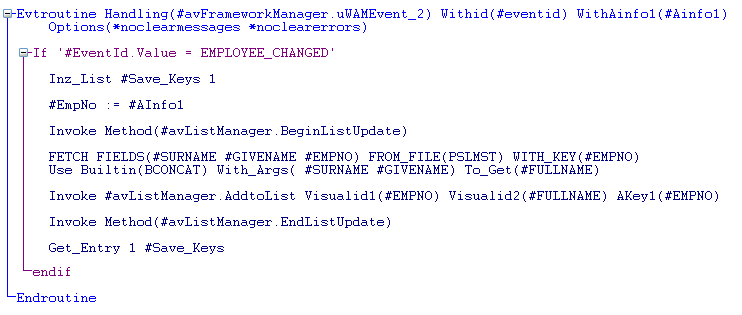
- Compile the filter and check it in.