To review or change the Transformation Maps linked to a trading partner definition, select the required trading partner in the trading partners list and then click the Linked Maps tab in the command handler area.
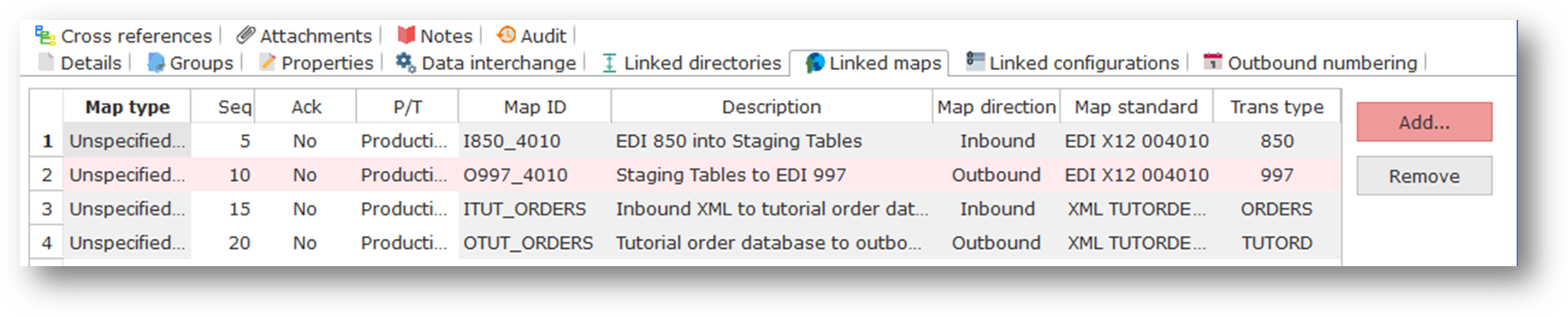
You can add, remove or modify linked Transformation Maps:
- To add (or replace) a linked Transformation Map, press the Add button. Then select the Map Type and Transformation Map ID from the pop-up list and click OK.
You can add any number of linked Transformation Maps for any one defined map type. If you add more than one map of the same type, then the value entered in the Sequence column will affect the evaluation order when you refer to Trading Partner linked Transformation Maps in a Processing Sequence using the Trading Partner built-in variables or using the FIND_TPMAP activity.
- To remove a linked Transformation Map for this trading partner, select the line to be removed and then press the Remove button.
Remember to Save before switching elsewhere in LANSA Composer.
Refer to Code Maintenance for information on defining transformation map types to be used with LANSA Composer.
For information about accessing linked TransformationMaps for a trading partner in a processing sequence, refer to Trading Partner (*TRADINGPARTNER) Built-in Variable Qualifiers.
To execute a Transformation Map linked to a trading partner in a processing sequence you must use the supplied TRANSFORM activity. Refer to TRANSFORM for information on this activity.