This section provides information on how to configure the WhereScape GIT Enablement Pack on both Developer and Deployment Machines.
Prerequisites
The following technologies should be in place before following the configuration setup for all Development and Deployment machines:
Software
- Python 3.11.5
The following Python libraries have been installed using pip:- GitPython - pip install GitPython
- Tkinter - pip install tk
- Psycopg2 - pip install Psycopg2
- PyYAML - pip install PyYAML
- XML.etree.ElementTree - pip install ElementTree
- Requests - pip install Requests
- Logging - pip install Logging
- WhereScape 3D, 9.0.5.4+
- Instructions on installation can be found at the following link: WhereScape 3D Installation Instructions.
- Includes the WhereScape MetaServer (wsmetaserver) which installs a local PostgreSQL database server used to store metadata.
- This PostgreSQL server is typically installed automatically during the WhereScape 3D setup process.
- Alternatively, users can connect to an existing PostgreSQL server if preferred.
- WhereScape RED, 10.4.0.1+
- Requires a PostgreSQL database to store metadata.
- This can be hosted on the same MetaServer (wsmetaserver) installed with WhereScape 3D or on a separate PostgreSQL server, depending on your environment setup
- GIT
- Repository – this must be created separately. Instructions to do this can be found in the GitHub Documentation here: Creating a GitHub Repository.
- Supported GIT Platforms:
- GitHub
- GitHub Enterprise
- Azure DevOps
- GIT Tools
- GIT CMD: can be installed here: GIT CMD Install
Environment Configuration
Ensure that the system-wide PATH environment variable includes the path to the GIT CMD executable (e.g. "C:\Program Files\Git\cmd"):
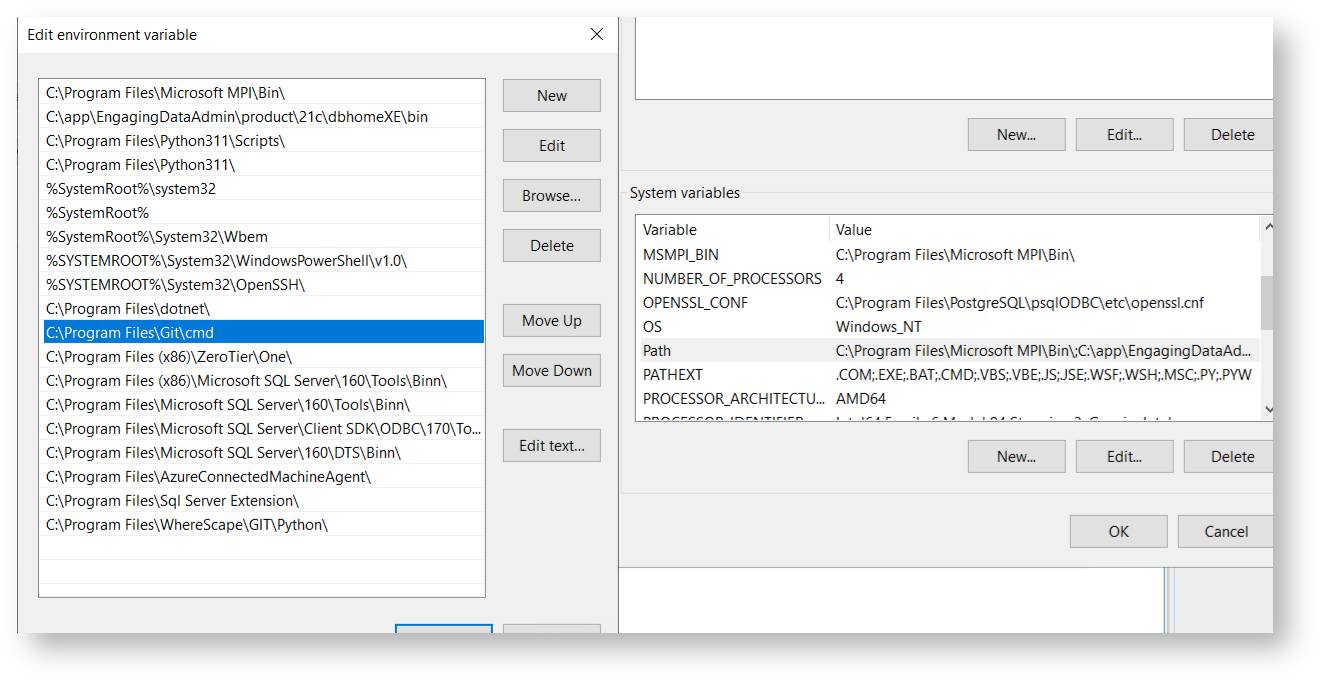
Make sure the following user-level PATH entries exist:
- %USERPROFILE%\AppData\Local\Programs\Python\Python311\
- %USERPROFILE%\AppData\Local\Programs\Python\Python311\Scripts\
- C:\Program Files\Git\cmd\
- C:\Program Files\Git\bin\

You may need to add Proxy authentication, to enable access to the API for Personal Access token authentication:
- Add http_proxy: http://[ProxyAddress]:[Proxy Port]
- Add https_proxy: https://[ProxyAddress]:[Proxy Port]