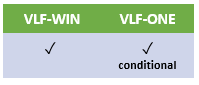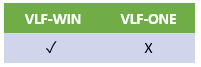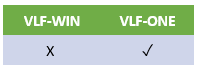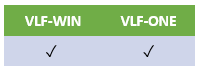
Your filter components and command handlers communicate with the instance list by these methods.
| Method | Description | |
|---|---|---|
BeginListUpdate | In VLF-WIN, this method is used to indicate to the list manager that you are about to begin updating the instance list. In effect, BeginListUpdate and EndListUpdate are used to define the boundaries of your list update transaction. The list manager will cause the busy light to be displayed when you begin a list update. Also, see Updating and Deleting Instance List Entries in VLF-WIN. In VLF-ONE applications, this method has no effect. | |
ClearList
| This method used to clear the current instance list. | |
AddtoList
| This method is used to add a new entry to the instance list. You need to supply VisualID1 and VisualID2 as well as AKeyn and NKeyn values to this method. There is also a Select parameter available to indicate whether the instance should be selected. The AddToList method has an optional BusinessObjectType parameter which allows filters to add different business object types to the same instance list. VLF-WINIn VLF-WIN, you can use this method also to update an existing instance list entry. In VLF-WIN, there is an optional RowColor parameter that allows filters to specify the color when adding an instance list entry. See Changing the Color and Style of List Entries. In VLF-ONE applications, this method should be used only to add new instance list entries. It should NOT be used to update existing instance list entries because there is a better method available. See Updating an Instance List Item. There are optional ParentDataItem, RelatedReference, and RowStyle parameters. Additionally, an optional reference to the #VF_LM003O instance list item that was created or updated is returned. Note: In VLF-ONE, the SetAsCurrent and Select parameters will only have effect if the item is a new item. Note: In VLF-ONE, the ExecuteDefaultCmd parameter indicates that the command that the user is currently using will be opened. If no command is currently in use, or the command being used is defined in the business object as Default=Never, the business object's default command will be used. | |
EndListUpdate | In VLF-WIN, this method is used to indicate to the list manager that you have completed updating the list. The list manager will turn off the busy light and update the list displayed on the screen. In VLF-ONE applications, this method has no effect. | |
RemovefromList | This method is used to remove an entry from the instance list. AKeyn and NKeyn values are required to uniquely identify which entry is to be removed. If the entry does not exist then the request is ignored. | |
UpdateListEntryData | In VLF-WIN, this method is used to update the data content of an existing instance list entry. If the entry does not exist, then the request is ignored. It does not need to be bracketed by BeginListUpdate and EndListUpdate method calls. In VLF-ONE applications #VF_LM003O list items are directly updated, and then their avUpdateDisplay method is used instead. | |
RefreshRelationship | Not supported nor required in VLF-ONE applications. In VLF-Win, this method is used to refresh a child/descendant tree 'cluster' in an instance list that is displayed as a tree. This method causes a tree child node cluster to be refreshed by calling the relationship handler again. Things you need to know about this method:
Also, see Updating and Deleting Instance List Entries in VLF-WIN. | |
AlterColumnHeadings
| In VLF-WIN, this method is used to override the instance list column headings at run time. This can be used to make the instance list suit the result of different filter searches. VLF-ONE does not provide this method. Instead, you can get and set the column heading property directly using logic like: #AVLISTMANAGER.InstanceListBrowser.VisualIDColumns<2> := “Alternate Heading” See shipped example DF_T3003O | |
ResetAlteredHeadings | In VLF-WIN, this method is used to remove all overrides the instance list column headings. VLF-ONE does not provide this method. Refer to AlterColumnHeadings. | |
DisplaySorted
| This method is used to sort the instance list by a visible or hidden column at run time. Up to four sort columns can be specified. VLF-ONE does not provide this method. Instead, you can access and sort the column object directly using logic like: Set Com(#AVLISTMANAGER.InstanceListBrowser.VisualIDColumns<2>) Sortposition(1) Sortdirection(Ascending) See shipped example DF_T3002O | |
avOutputListasCSV
| In VLF-ONE, this method is used to send the instance list to the user as a CSV file. The output is based on the full contents of the instance list, and does not reflect any Quick Search filtering. | |
avVisualList
| In VLF-ONE, this method returns a reference to the visual list object, if the instance list visualizer makes it available, and if it is a PRIM_LIST. It may be null. This method can be used with a snap in instance list, if the snap in list visualizes using a PRIM_LIST. You would need to redefine mthroutine uGetVisualList to supply a reference to the list control it uses. For example, if it uses a PRIM_LIST called #MyList: Mthroutine Name(uGetVisualList) Options(*REDEFINE) #uList <= #MyList Endroutine | |
avSetColumnCaption | In VLF-ONE, this method is used to override an instance list column's caption. | |
avSetColumnVisibility | In VLF-ONE, this method is used to show or hide an instance list column. #AVLISTMANAGER.avSetColumnVisibility Ucolumntype(V) Ucolumninstance(2) Uvisible(False) See shipped example DF_T3001O. The Column type must be: V - Visual ID A – Acolumn N – Ncolumn D – Dcolumn If the instance of the column is not found for this business object, the instruction is ignored. This will override any remembered values for hiding the column for this user. Any changes made by this method will be reflected in the popup menu that allows the user to show / hide instance list columns. If a column is defined as hidden for this form factor (/screen size), avSetColumnVisibility cannot show the column. | |
CreateorUpdateDisplayedItem
| In VLF-ONE, this method is used to update the visualization of an instance list entry after the Data Item (#VF_LM003O list item) has been changed. Usually, it is not needed because the Data Item method avUpdateDisplay will do the same thing. | |