So far, we have identified and classified three screens:
- The IBM i Main Menu as MAIN
- The Work with Active Jobs as WRKACTJOB
- The Display Program Messages screen as MESSAGES
We are now able to automate a navigation from MainLogin to Work with Active Jobs.
As we classified each screen, the RAMP designer created an object for it in the navigation tree. At the same time it generated a default script for each one of them.
For example, in the navigation tree under Junctions, expand MAIN, then scripts and click on the FORMSCRIPT_nn entry:
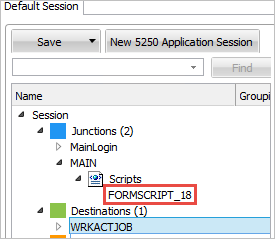
Scripts are user modifiable. Initially, the scripts contain a basic skeleton.
Take a moment to examine them before any changes are applied to them.
Notice how all of them have two functions:
- vHandle_ARRIVE: function(sToForm, oPreviousForm). RAMP will execute the script enclosed in this function when this screen arrives.
- vHandle_NAVIGATETO: function(sToForm, oPreviousForm). RAMP will execute this script upon completion of the ARRIVE script. It will contain the statements to navigate from this screen to several others, conditionally.