You can use the function to display marriage status information for people identified by an identification number (#IDNO). You enter the number on a selection screen after which you can view and delete information. When you click the Change button a screen with input capable fields is displayed: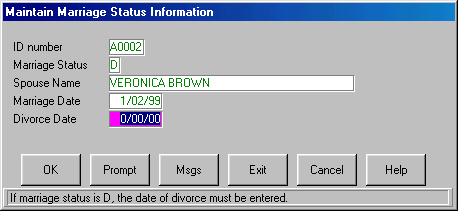
Note that this screen does not indicate in any way which fields are mandatory for a particular marital status. Validation rules are applied only when you click the OK button.
Source for the Function
Here is the source for the function:
     FUNCTION OPTIONS(*NOMESSAGES *DEFERWRITE *DIRECT)
     GROUP_BY NAME(#PANELDATA) FIELDS(#IDNO #STATUS #SPOUSE #MARRIED #DIVORCED)
     ********** COMMENT(Loop until user EXITs or CANCELs)
     BEGIN_LOOP
     R10: REQUEST FIELDS(#IDNO) DESIGN(*DOWN) IDENTIFY(*DESC)
     ********** COMMENT(Fetch file MARRIAGE details     )
     FETCH FIELDS(#PANELDATA) FROM_FILE(MSTATUS) WITH_KEY(#IDNO) NOT_FOUND(R10) ISSUE_MSG(*YES)
     ********** COMMENT(Display results to the user      )
     SET_MODE TO(*DISPLAY)
     POP_UP FIELDS(#PANELDATA) DESIGN(*DOWN) AT_LOC(*UPPER 7) CHANGE_KEY(*YES) DELETE_KEY(*YES)
     IF_MODE IS(*CHANGE)
     UPDATE FIELDS(#PANELDATA) IN_FILE(MSTATUS)
     ENDIF
     IF_MODE IS(*DELETE)
     DELETE FROM_FILE(MSTATUS) ISSUE_MSG(*YES)
     ENDIF
     END_LOOP