In VLF-ONE, RAMP applications can be run using IIS on your PC. (They show RAMP screens sourced from aXes on an IBM i.)
In that scenario, the runtime VLF-ONE application will be using:
- A .Dat file containing the definition of the VLF (e.g. VF_VLFONE_SYSTEM_ENG_VLFONE_Definition.DAT).
- One or more Nodes.js files containing the RAMP definitions (e.g. Vf_VLFONE_Nodes_RAMP_DEFAULT_SESSION.js).
These files will be located as shown: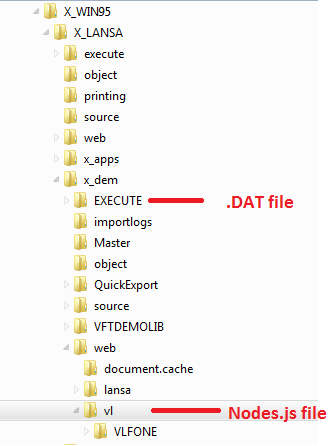
In your development environment, the files will be saved to these locations automatically when you save the Framework.
If using an IBM i as the server for your VLF-ONE application, the locations are similar (on the IFS). Usually they are in a subdirectory of \LANSA_dc@pgmlib (or similar).
You will need to manually move your .Dat files and Nodes.js files from your development PC to the equivalent directory on the IFS whenever they change.
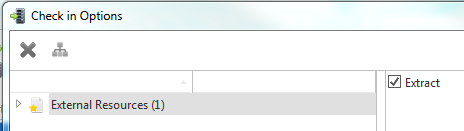
You can do this by mapping a drive and copying the files directly. Or, in the lansa IDE, you can create an external resource that points to each file and use check in to move it to the IBM i. Whenever the file changes in your development environment, you open the external resource, save it, and check it in. There is an option on check in called Extract. Make sure this is checked.