To refresh property files while the JSM is running you can use either the Integrator Studio Refresh menu item: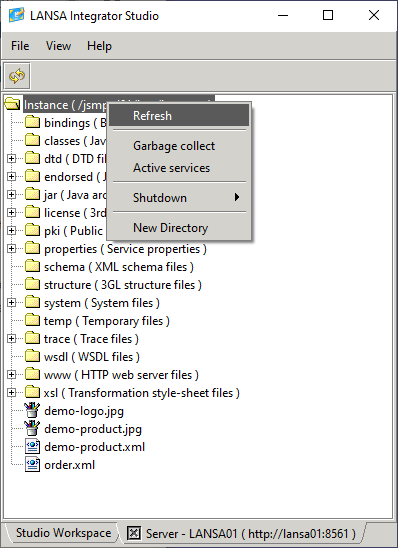
or
the Console Refresh resources option: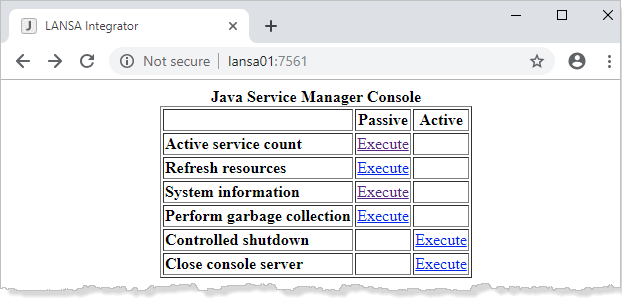
The following property files will be re-loaded:
list.properties
service.properties
structure.properties
manager.properties
Only the following manager properties will be updated and available after a refresh:
trace.fields
trace.threads
trace.keywords
trace.connections
pool.hosts
console.timezone
console.authentication
console.authentication.{user}
studio.authentication
studio.authentication.{user}
studio.include.trace.directory
shutdown.controlled.wait
shutdown.controlled.repeat
ftp.ssl.factory
ftp.ssl.provider
ftp.ssl.protocol
ftp.ssl.keyStore
ftp.ssl.keyStoreType
ftp.ssl.keyStorePassword
ftp.ssl.keyAlias
ftp.ssl.keyAlgorithm
ftp.ssl.trustStore
ftp.ssl.trustStoreType
ftp.ssl.trustStorePassword
ftp.ssl.trustAlgorithm
ftp.ssl.trustServer
http.ssl.factory
http.ssl.provider
http.ssl.protocol
http.ssl.keyStore
http.ssl.keyStoreType
http.ssl.keyStorePassword
http.ssl.keyAlias
http.ssl.keyAlgorithm
http.ssl.trustStore
http.ssl.trustStoreType
http.ssl.trustStorePassword
http.ssl.trustAlgorithm
http.ssl.trustServer
The following manager properties are only used at JSM startup and the refresh will have no effect:
tcp.port
tcp.backlog
tcp.interface
tcp.nodelay
tcp.timeout
tcp.buffer.send
tcp.buffer.receive
console.tcp.port
console.tcp.backlog
console.tcp.interface
console.tcp.nodelay
console.tcp.timeout
console.tcp.buffer.send
console.tcp.buffer.receive
pool.tcp.port
pool.tcp.backlog
pool.tcp.interface
pool.tcp.nodelay
pool.tcp.timeout
pool.tcp.buffer.send
pool.tcp.buffer.receive
The following manager properties are only set once at JSM startup and the refresh will have no effect:
javax.net.debug
javax.net.ssl.keyStore
javax.net.ssl.keyStoreType
javax.net.ssl.keyStorePassword
javax.net.ssl.trustStore
javax.net.ssl.trustStoreType
javax.net.ssl.trustStorePassword
ssl.KeyManagerFactory.algorithm
ssl.TrustManagerFactory.algorithm
ssl.SocketFactoty.provider
ssl.ServerSocketFactory.provider
networkaddress.cache.ttl
networkaddress.cache.negative.ttl
log4j.configuration