In this step you will define a new response WebRoutine which the AJAX enabled Dynamic Select box for sections will invoke.
1. Select the Source tab.
2. Create a new response WebRoutine, that will be invoked by the sections dynamic select box when DEPTMENT changes. The requirements for this WebRoutine are:
- The WebRoutine statement must have a Response() keyword with a value of *JSON
- A web_map for input, field DEPTMENT
- A web_map for output of the list SectDD, defined as a *JSON list
- Invoke the buildDD2 method routine passing DEPTMENT and SECTION
Your code should look like the following:
WebRoutine Name(USectDD) Response(*JSON) Web_Map For(*input) Fields(#deptment) Web_Map For(*output) Fields((#sectdd *JSON)) #com_owner.buildDD2 I_Dept(#deptment) I_Sect(#section) Endroutine
3. Compile your WAM.
4. Open WebRoutine Details in the Design view.
5. Select the Section's dynamic select box and set up additional properties as follows:
updateOnFieldChange | DEPTMENT |
|---|---|
updateWrName | uSectDD |
updateFieldsToSubmit | Field: DEPTMENT |
Field Value: DEPTMENT |
|
6. Set the updateFieldsToSubmit property by selecting the Value column and clicking on the Ellipsis  button to open the Design of… property's dialog.
a. Select a field Name of DEPTMENT
b. For Value, enter DEPTMENT.
c. Select the Field radio button.
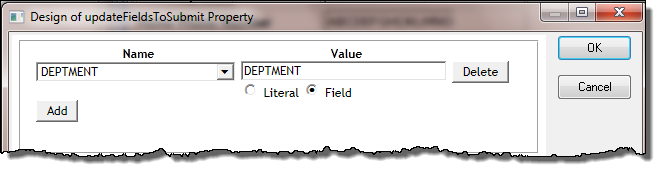
7. Click OK to close the dialog.
8 Save your WAM.
9. Test your WAM by running the Begin webroutine. You should now be able to select a new department and notice that the sections dropdown list is refreshed.
In a later exercise, you will learn more about using the dynamic select box weblet.