Page History
What is Webview2?
WebView2 allows for the embedding of an Edge browser within a Windows applications meaning webpages can be viewed within the application frame.
Visual LANSA V16 sees the introduction of a new Primitive for Webview2 called PRIM_WEBV, this allows for a modern browser to be embedded into a users VL Windows application with access to the browser controls to build your own UI around it.
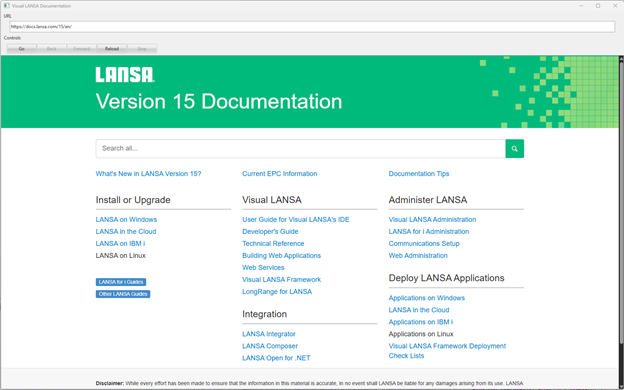
Using WebView2
Component Definition
The Visual LANSA Primitive for WebView2 allows for standard controls of a web page (Navigate, back, forward, stop and reload) and access to the Navigation starting and completing events from the browser to help control your UI.
Define_Com Class(#PRIM_WEBV) Name(#WebView) Parent(#COM_OWNER) Displayposition(1) Tabposition(1) Height(890) Top(116) Left(0) Width(1659) Defaulturl('https://docs.lansa.com/15/en/')Properties
CanNavigateBack
Returns a Boolean as to whether the browser can navigate back in history
CanNavigateForward
Returns a Boolean as to whether the browser can navigate forward in history
DocumentTitle
Returns a string that is the title of the current html document
DefaultURL
sets the URL which will load once the webview is initialized.
Source
returns the current URL in the Webview component.
...
     Mthroutine Name(ToggleControls)

        #BTN_Back.Enabled := #WebView.CanNavigateBack
        #BTN_Forward.Enabled := #WebView.CanNavigateForward
        #URL := #WebView.Source
        #COM_OWNER.Caption := #WebView.DocumentTitle

     Endroutine
Methods
NavigateBack
Navigates back in history
...
#WebView.Stop
Endroutine
Events
- NavigationComplete – Fired when the loading of a webpage has finished
...
#COM_SELF.ToggleControls
Endroutine
Sample
* **************************************************
...