Page History
[  |../../index.htm#lansa/inseh_015.htm]
You are here:
...
You must use the LANSA Web Administrator to Web enable the partition.
Complete the following steps: 1. Start
- Start the Web Administrator.
...
- Connect to the
...
- IBM i Data/Application Server as Partition Security Officer.
...
- Choose the Tools menu and select the Enable Partition… command.
...
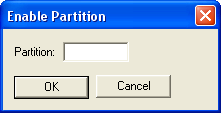
- The Enable Partition dialog will open.
...
...
- Enter the 3 character partition identifier (such as SYS) and press OK to Web enable the partition.
...
- This option will create the required Standard HTML pages in the partition. You should Web enable a partition only once.
...
- Exit the LANSA Web Administrator.
Go to 1.6.4 Default User for the IBM i Partition (Optional).
[ |../../index.htm#lansa/inseh_015.htm]