Page History
[  |../../index.htm#lansa/frmeng01_0032.htm]
You are here:
...
Objectives
...
- To introduce the Visual LANSA debugger.
- To learn how to set breakpoints in a form.
- To learn how to display and change variables in a program during debug.
The focus of this exercise is how to use the features of the debugger. A detailed understanding of the RDML commands is not important at this time. The Programming exercises teach the basic coding practices.
To achieve these objectives, you must complete the following:
Step 1. Execute Applications with Debug
Step 4. Display/Change Variables
Step 5. Set Breakpoint Properties
Before You Begin
You must complete the previous exercises.
| Note |
|---|
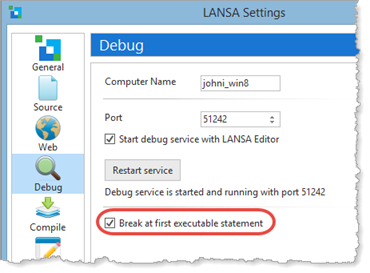
| Note: This exercise assumes your Debug Settings (see File menu / Options) are Break at first executable statement. |
For more information on the topics in this exercise, go to the Visual LANSA User Guide: Debugging Applications.
[ |../../index.htm#lansa/frmeng01_0032.htm]