Page History
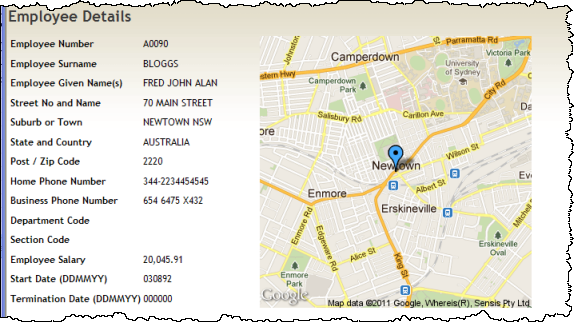
In this step you will extend the Details WebRoutine to use the employee address fields to set up the URL string which will be output as the #ADDRESS field.
Review the example Google URL provided in Objectives, and note the Brooklyn Bridge address values in that string.
An employee address such as:
70 MAIN STREET (field ADDRESS1)
NEWTOWN NSW (field ADDRESS2)
AUSTRALIA (field ADDRESS3)
Must be used to produce a string inside the Google URL such as:
MAIN+STREET,NEWTOWN,NSW,AUSTRALIA
Your code needs to do the following:
- Remove house number
- Remove leading spaces
- Add + between words in an address line
- Add a comma between elements in field ADDRESS2
...
- Define two work fields at WAM level (below the Begin_com):
...
Define Field(#addr1)
...
Reffld(#address1)
...
Define Field(#addr2)
...
Reffld(#address2)
...
- In the Details WebRoutine add the following logic, immediately after the FETCH statement.
...
- Remove numbers and first space character from ADDRESS1
- Remove numbers and first space character from ADDRESS1
...
#addr1 :=
...
#address1.removecharacters(
...
"1234567890"
...
).remove(
...
"
...
"
...
)
...
- Replace space character (between words) with a +
- Replace space character (between words) with a +
...
#addr1 :=
...
#addr1.replace(
...
"
...
",
...
"+"
...
)
...
- Replace space character in ADDRESS2 with comma.
- Replace space character in ADDRESS2 with comma.
...
#addr2 :=
...
#address2.replace(
...
"
...
",
...
","
...
)
...
- Define the field ADDRESS as the complete Google URL
#ADDRESS := 'http://maps.googleapis.com/maps/api/staticmap?center=' + #addr1 + ',' + #addr2 + ',' + #address3 + '&zoom=14&size=340x340&maptype=roadmap&markers=color:blue%7C' + #addr1 + ',' + #addr2 + ',' + #address3 + '&sensor=false'
- Define the field ADDRESS as the complete Google URL
...
Note that the size value in the URL has been changed to 340x340.
...
- All other values use the supplied example values for example, for color. These could all be adjusted by reference to the Google web site for this service.
- All other values use the supplied example values for example, for color. These could all be adjusted by reference to the Google web site for this service.
...
- Compile and test your WAM. Your details web page should now look like the following: