Page History
Without any CSS, the Tab Pages HTML will produce this result (table border added for clarity):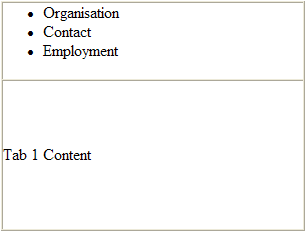
To start, you need to remove the list-style and margins from the UL tag:CSSが無い状態では、タブ・ページのHTMLは次のような結果になります。(分かりやすくするため、テーブルに枠線が追加されています。)
まず始めに、ULタグからlist-styleとmarginを取り除く必要があります。
     ul.std_tab_pages_tabs
     {
          list-style-type: none;
          margin: 0px;
     }
Next you'll add some borders and background colors to the LI tags, use float:left to distribute them horizontally and apply a margin to separate them:次に、LIタグに枠線と背景色を追加します。これを水平に配置するためにfloat:leftを使用し、marginを使ってこれを分割します。
     ul.std_tab_pages_tabs li
     {
          border: 1px solid #7db0e5;
          background-color: #e2effa;
          color: black;
          white-space: nowrap;
          display: block;
          float: left;
          margin-right: 2px;
     }
Finally, add a border around the content area:最後に、コンテンツ・エリアの周りに枠線を追加します。
     .std_tab_pages_content_wrapper
     {
          border: 1px solid #7db0e5;
          padding: 2px;
     }
Your table and list should now looks like this: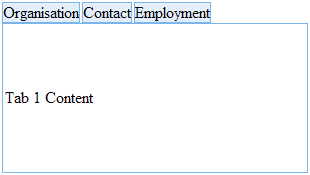
Next, put a little spacing around the tab text and change the background color of the selected tab. You also need to remove the bottom border from the selected tab and extend the tab vertically to fill the space by increasing its bottom padding. (It is done this way because Internet Explorer draws the left and right borders unevenly if you try to change the color of the bottom border):これで、テーブルとリストは、次のようになります。
次に、タブ・テキストの周りに少しスペースを入れ、選択されたタブの背景色を変更します。選択されたタブの下部の枠線を取り除き、その下部の余白を増やして、このタブを縦方向に伸ばしスペースを埋める必要があります。(これを行うのは、下部の枠線の色を変更しようとすると、Internet Explorerが左右の枠線を不均等に描いてしまうからです。)
     ul.std_tab_pages_tabs li a
     {
          display: block;
          padding: 3px;
          text-decoration: none;
          font-weight: bold;
     }
     ul.std_tab_pages_tabs li.std_tab_active
     {
          background-color: white;
          color: black;
          border-bottom: none;
          padding-bottom: 1px;
     }
Finally you need to move the tabs down by the border width so that their bottom borders overlap the border of the content area. You can do this by making the table cell containing the tabs relatively positioned and shifting it down by the width of the border:最後に、タブを枠線の幅分だけ下に動かして、その下部の枠線がコンテンツ・エリアの枠線に重なるようにします。これは、相対配置されたタブを含むテーブルのセルを作り、これを枠線の幅分だけ下に位置を動かすとできます。
     .std_tab_pages_top_tabs
     {
          position: relative;
          top: 1px;
     }
This cell shifting technique only works in Internet Explorer. In Firefox and Opera you need to move the UL block down by the border width (which does not work in IE):このセル移動の方法はInternet Explorerでのみ使用可能です。FirefoxやOperaでは、枠線の幅分だけULブロックを下に動かす必要があります。(これはIEではできません。)
     ul.std_tab_pages_tabs
     {
          position: relative;
          top: 1px;
     }
最終的な結果は次のようになります。The end result is this: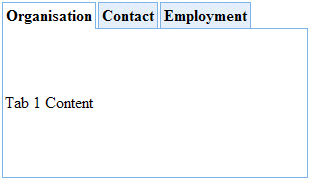
Some of the styles used only apply to tabs positioned along the top of the content area so you need to create some more styles with more specific selectors to ensure the properties are only applied to top aligned tabs:
使用されるスタイルの中には、コンテンツ・エリアの上部に沿って配置されたタブにのみ適用されるものがあるので、プロパティが上部に配置されたタブにのみ確実に適用されるように、より特定のセレクターを持ったスタイルを作成する必要があります。
     .std_tab_pages_top_tabs ul
     {
          position: relative;
          top: 1px;
     }
     .std_tab_pages_top_tabs ul li.std_tab_active
     {
          border-bottom: none;
          padding-bottom: 1px;
     }