Page History
メニュー・アイテム・デザイナーを開くには、以下の手順に従ってください。
- ページ上の動的 HTML メニューバー・ウェブレットが選択されていることを確認し、[詳細] タブをクリックしてください。
- マウスポインタを[詳細]タブのmenu_itemsプロパティに移動します。省略記号(...)がプロパティ値の横に表示されます。省略記号のボタンをクリックし、メニュー・アイテムのデザイナを開きます。下のようなウィンドウが開きます。
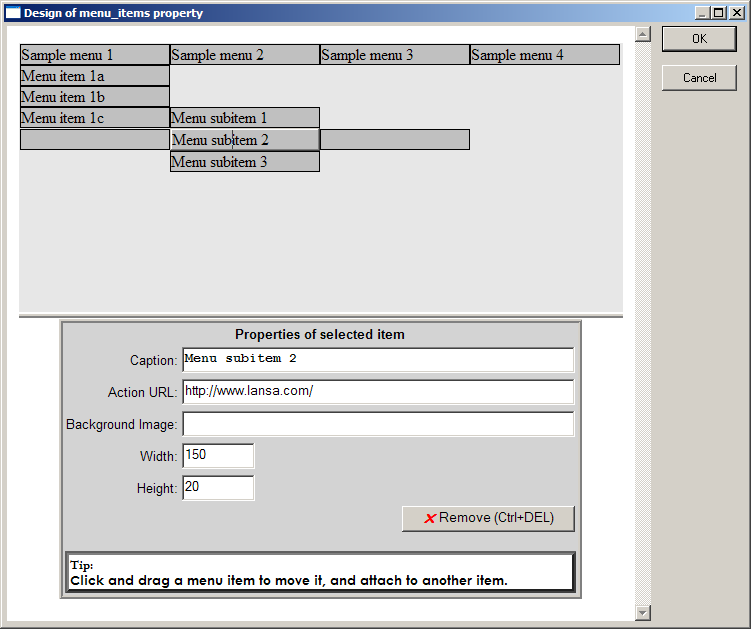
ウィンドウの上半分はメニューの現在の状態を示しています。これはorientationプロパティの現在値に関わらず、常に水平方向に表示されることに注意してください。このウィンドウの上半分では、次のことができます。
- 項目をクリックし、下半分で詳細を入力。
- ドラッグ・アンド・ドロップして項目を並び替え。
- 現在選択されている項目の隣に表示されるブランクの項目をクリックして、新しい項目を追加。
- 項目を選択、[削除]ボタンをクリックして項目を削除。
ウィンドウの下半分では選択した項目の詳細を次のように指定することができます。
Caption
メニュー・アイテムに表示するテキストを指定します。ウィンドウの上半分でメニュー・アイテムをクリックしてタイプし、テキストを直接入力することもできます。
実行URL
メニュー・アイテムがクリックされた時に移動するURLを指定します。URL全体を指定することも、現在のページに関連付けられたURLを指定することもできます。適切なURLを指定することで、URLは他のwebroutineを呼び出すことができます。
背景イメージ
メニュー・アイテムの背景として表示されるイメージのパスとファイル名を指定します。
Width
メニュー・アイテムのピクセルの幅を指定します。この値とウェブレットのwidthプロパティがメニュー・バーとアイテムの幅をどう決定するかについて、メニュー・バーとメニュー・アイテムの幅と高さについて理解するを参照してください。
Height
メニュー・アイテムのピクセルの高さを指定します。この値とウェブレットのheightプロパティがメニュー・バーとアイテムの高さをどう決定するかについて、メニュー・バーとメニュー・アイテムの幅と高さについて理解するを参照してください。
To open the menu item designer, follow these steps:
1. Make sure the Dynamic HTML menu bar weblet on your page is selected and then click on the Details tab.
...
- click on items to complete their details in the lower half;
- drag and drop items to rearrange them;
- add new items by clicking on the blank items shown adjacent to the currently selected item;
- remove items by selecting them and clicking the Remove button.
In the bottom-half of the window you can specify the details for the selected item as follows:
Caption
Specifies the text that appears on the face of the menu item. You can also enter the text directly on the face of a menu item by clicking on it in the top-half of the window and typing.
Action URL
Specifies a URL that the menu item will navigate to when clicked. You can specify a complete URL or one that is relative to the current page. The URL can invoke another webroutine by specifying an appropriate URL.
Background Image
Specifies the path and file name of an image to be displayed as background to the menu item.
Width
Specifies the width in pixels of the menu item. See Understanding menu bar and menu item width and height for information on how this value and the weblet width property determine the menu bar and item width.
Height
...