Page History
日付ウェブレットは日付の表示、入力、プロンプト、妥当性検査のサポート追加機能を持つテキスト入力ボックス・コントロールを提供します。<input typeThe date weblet provides a text input box control with added features to support the display, entry, prompting and validation of dates. It broadly corresponds to the <input type="text"> HTML element.エレメントと概ね同じです。
このウェブレットの例を以下に示します。この例では、カレンダー・プロンプト・ボタン(オプション)がクリックされた場合、カレンダー・プロンプト・ウィンドウが表示されます。
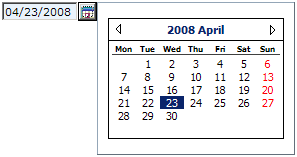
日付ウェブレットは日付タイプ(date)のフィールドと共に使用するのが一番良い方法です。このタイプを使用すると、データは自動的にウェブレットが想定されている形式で受け渡されます。パック形式や符号付きなど他の数値タイプのフィールドに日付ウェブレットを使用することもできますが、数値が日付ウェブレットで想定される正しいISO形式であることを自身の責任で確認する必要があります。例えば、YYYYMMDD形式の日付を含むAn example of the weblet is shown below. In this example, the (optional) calendar prompt button has been clicked and the calendar prompt window is visible.
The date weblet is best used with fields of type date. If you use this type, the data will automatically be passed in the format expected by the weblet. You can use the date weblet with fields of other numeric types such as packed or signed, but it is your responsibility to ensure the numeric value is formatted in the correct ISO format expected by the date weblet. For example, you could use a signed (8, 0) field containing a date in YYYYMMDD format with an edit word のフィールドは、ISO日付形式に形式変換するための編集文字 ('0 - - ') to format it as an ISO date format.と共に使用します。