Page History
...
In the event of difficulties or errors completing the connection to your LANSA Composer server, please refer to the following:
Troubleshooting Connection Errors
Type the User name and Password
...
If you connect to more than one LANSA Composer server, you may need to use a different user name username and/or password for each server.
...
| Note |
|---|
| Note: If you wish to create and use your own user profiles to connect to your IBM i server, refer to Creating Further User Profiles for Use with LANSA Composer. |
When connecting to a new default installation of LANSA Composer server on Windows, you can usually use the User Id (and its password) that you entered in the User Id for Visual LANSA for Web Configuration during the LANSA Composer Server for Windows installation. For example:
...
The server exceptional arguments that most usually are used to connect to the LANSA Composer server database are listed in the table. You should refer to LANSA documentation topics X_Run Parameter Summary and DBID, DBUT, DBII, and DBIT Parameters for more complete information.
...
For the server connection, LANSA Composer pre-fills the Server exceptional arguments with the following defaults:
Code Block DBID=*SERVER DBII=*SERVER
In most cases, this is appropriate and will cause the LANSA Composer server connection to use values specified in the x_lansa.pro file on the server, which can be found in the .\X_WIN95\X_LANSA folder of the Windows server application installation.
- Depending on your specific configuration, the DBII= keyword and argument value can be important for the successful operation of LANSA Composer and should usually be specified in addition to DBID= (they should usually have the same value).
LANSA Composer does use certain LANSA internal tables for messages, locking, and other purposes. Certain LANSA Composer operations will not succeed if the DBII= value is not specified correctly.
...
The following table shows example values for Server exceptional arguments when connecting to the specified databases. You will need to alter these to suit your database or DSN names, system configuration, and environment. You should refer to The X_RUN Command in the LANSA Technical Reference Guide for more information.
...
To define additional servers using the LANSA Communications Administrator, follow these steps:
- Fully expand the Connect to LANSA Composer server window, if not already expanded.
- Click the Open LANSA Communications Administrator button.
- In the LANSA Communications Administrator window, click New.

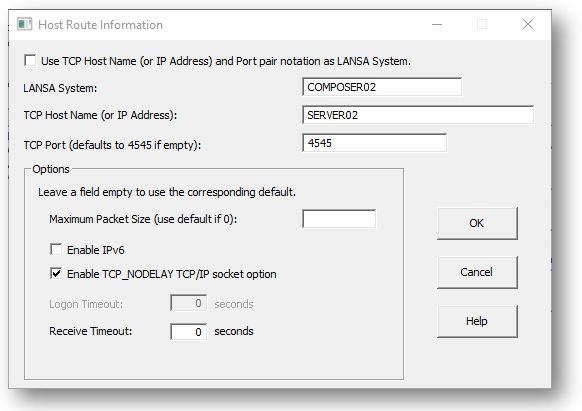
Complete the fields in the Host Route Information window as follows:
Partner LU Name Type a symbolic name that you wish to use as the new Server connection name. For example, you might use COMPOSER02 as the name for your second LANSA Composer server.
Fully Qualified Name of the Host Type the DNS name or the IP address of the server system containing the required LANSA Composer server installation. For example, SERVER02 or 192.168.192.2.
Connection Identifier Type the port number used for the LANSA listener in the required LANSA Composer server installation. For example, 4545.
- Click OK to save the new Host Route Information details and then close the LANSA Communications Administrator window.
- In the Connect to LANSA Composer server window, type the new Server connection name using the name you specified in the Partner LU Name above. Then type the partition name and any further server connection attributes necessary to connect to that LANSA Composer server.
- Type the User and Password that apply to the new Server connection name and click Connect.
...