Page History
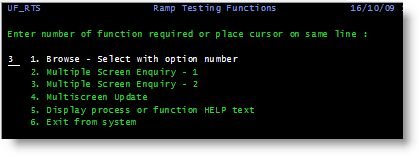
In this step you will use RAMP Tools name the process menu and the four screens.
| Info |
|---|
| If you do not understand how to do this you should stop doing this tutorial and complete one of the core tutorials instead. |
1. On the IBM i Main menu enter this command:
lansa run uf_rts partition(dem)
2. Name the screens:
Screen | Name You Should Use |
|---|---|
RAMP Testing Functions menu | UF_RTS Also name the option field txtOption. If you are completing this tutorial in a classroom setting, you will need to select option 3 in the RAMP Testing Functions menu to bring up the correct screens:
|
Request "Key" Screen | UFRTS03_R1 Also name the employee number field used in navigation as txtEmpNo |
Display "Data" Screen 1 | UFRTS03_D1 |
Display "Data" Screen 2 | UFRTS03_D2 |
Display "Data" Screen 3 | UFRTS03_D3 |