Page History
...
1. Scroll down to the event handling routine to UPDATE.Click NoteClick
| Note |
|---|
| Note: You can rapidly move to any routine in your code, by using the Go To tab. Expand routines and double-click on a routine to move to that line in the editor. |
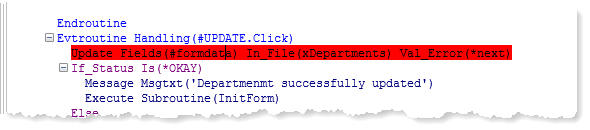
2. Press the F9 key to set a breakpoint on this line. The line is highlighted in red.
| Note |
|---|
...
| Note: You can set break points both before executing Debug or while running in Debug mode. Breakpoints are remembered in both cases (they are saved when you close the form in the editor). |
3. Press F5 to continue executing the form. Enter 1000 as the department code and click the Fetch button. The form will display the Internal Audit department. Leave the value of the Department Description as it is and click the Update button. When the form reaches the breakpoint, source code will be redisplayed, with the breakpoint line highlighted in yellow.
4. Display the Breakpoints tab. The new breakpoint will be listed as follows:
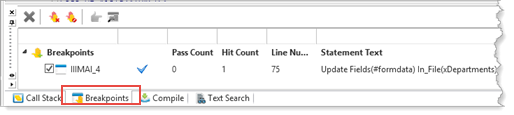
The program will now stop before executing this line of code. This will allow you to view and change the variables or make other changes to debug settings.
...