Page History
...
The major steps in the example procedure are:
1. In IIS, add a new site binding for LANSA Composer
2. In the LANSA Web Administrator, add a data/application server for LANSA Composer
3. Copy LANSA Composer's web images, styles and script files
4. In LANSA Composer, alter System Settings to use the new port number
When you have finished, continue with:
Running the LANSA Composer Client on the Windows Server
| Anchor | ||||
|---|---|---|---|---|
|
By default, the existing LANSA web application is being served using the default port 80.
...
d. Make sure you have saved all your changes. There is no need to restart IIS services yet.
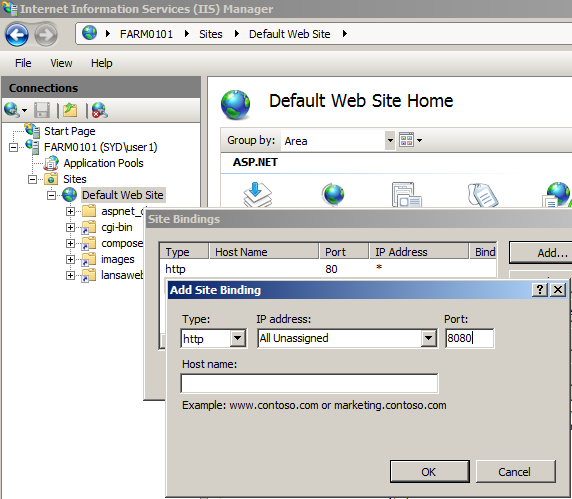
| Anchor | ||||
|---|---|---|---|---|
|
Perform the following steps to configure LANSA to invoke LANSA Composer to serve web requests made using the new port number:
...
f. Finally you should restart IIS now to cause the new configuration to take effect.
| Anchor | ||||
|---|---|---|---|---|
|
The LANSA Composer Windows server installation program installed the web images, styles and script files for LANSA Composer in the WebServer\Images directories of the LANSA Composer installation location.
...
- Image files named xfd*.* in WebServer\Image s
- Cascading style sheet files (.css) named xfd*.css in WebServer\Images\style
- JavaScript files (.js) named xfd*.js in WebServer\Images\script
| Anchor | ||||
|---|---|---|---|---|
|
Once IIS and LANSA web support are configured, you need to change the base URL used by LANSA Composer for the Management Console.
...