Page History
...
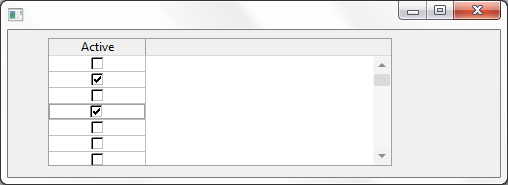
This Visualization type is useful for a Field that is used as a Boolean(TRUE\FALSE).
Details
1. Through the Field Component source add a Picklist visualization ( PRIM_EVPL ) and a Picklist. Note that these are separate classes in the Field source. Add PicklistItems for Male and Female to the Picklist. Save the field.
...
     Function Options(*DIRECT)
     Begin_Com Role(*EXTENDS #PRIM_FORM) Clientheight(147) Clientwidth(492) Height(174) Left(369) Top(152)
     Define_Com Class(#PRIM_GRID) Name(#GRID) Captionnoblanklines(True) Columnbuttonheight(17) Componentversion(1) Displayposition(1) Height(128) Left(40) Parent(#COM_OWNER) Showbuttonselection(True) Showselection(True) Showselectionhilight(False) Showsortarrow(True) Tabposition(1) Top(8) Width(344)
     Define_Com Class(#PRIM_GDCL) Name(#GDCL) Columnalign(Center) Displayappearance(CheckBox) Displayposition(1) Editappearance(CheckBox) Parent(#GRID) Readonly(False) Source(#ACTIVE) Usepicklist(True) Width(30)
     Evtroutine Handling(#COM_OWNER.CreateInstance) Options(*NOCLEARMESSAGES *NOCLEARERRORS)
     Select Fields(#SECTION) From_File(PSLMST)
     Add_Entry To_List(#GRID)
     Endselect
     Endroutine
     End_Com
Appearance
| Note |
|---|
Note: Clicking the check box will set the corresponding value for the field from the picklist items. Values are chosen from the following rule.
|