Page History
Control the use of your web jobs using the options on this tab.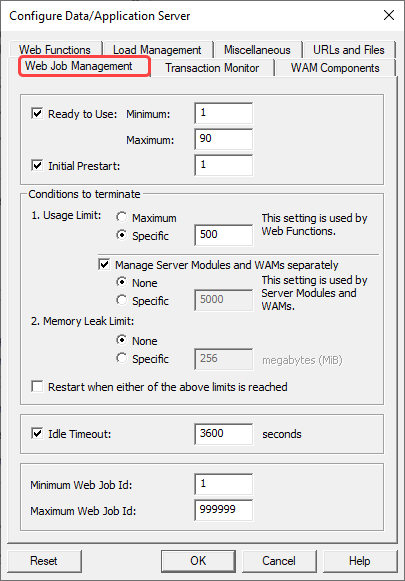
Ready to Use - Minimum and Maximum
...
The default is Enabled and default values for Minimum is set to 2 and Maximum is set to 2.
Initial Prestart:
| Info |
|---|
| Only applicable with a Data/Application Server running LANSA Version 13 SP2 EPC132900 or later. |
Enable this feature to use Initial Prestart. Enter the number of web jobs to prestart, so the system can handle requests faster.
The default is Disabled.
Conditions to terminate
Usage Limit
Enter the number of times a Web Job can be used in the range 1-999.
...
The default value is 1. (Windows)
| Info |
|---|
| Only applicable with a Data/Application Server running LANSA Version 15 or later. |
Manage Server Modules and WAMs separately
...
Minimum Web Job Id and Maximum Web Job Id (Windows and Linux host only)
| Info |
|---|
| Only applicable with a Data/Application Server running LANSA Version 11 SP5 or later. |
Enter the Minimum and Maximum Web Job Id. The values can be in the range 1 - 999999.
...