Control the use of your web jobs using the options on this tab.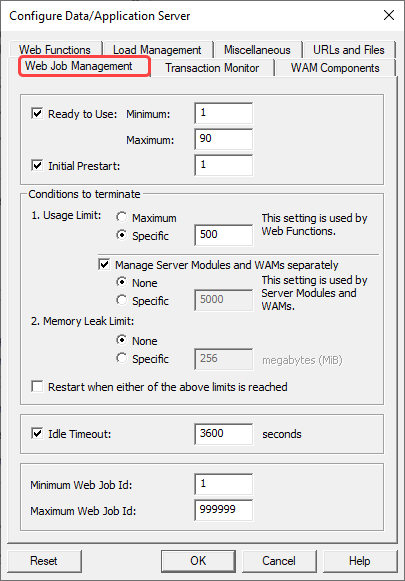
Ready to Use - Minimum and Maximum
Enable this feature to use Ready to Use Web Jobs. Enter the Minimum and Maximum number of Ready to Use Web Jobs.
Disable this feature with caution as the result might be more Ready to Use Web Jobs than desired. In effect there will be no upper limit on how many Ready to Use Web Jobs are available for the system.
The default is Enabled and default values for Minimum is set to 2 and Maximum is set to 2.
Initial Prestart:
Enable this feature to use Initial Prestart. Enter the number of web jobs to prestart, so the system can handle requests faster.
The default is Disabled.
Conditions to terminate
Usage Limit
Enter the number of times a Web Job can be used in the range 1-999.
The default value is 500. (IBM i and Linux)
The default value is 1. (Windows)
Manage Server Modules and WAMs separately
Enable to use specific values for Server Modules and WAMs.
When enabled, the Web Job counts execution of WAMs/Server Modules separately from Web Functions. Web Jobs expire when either the number of execution of WAMs/Server Modules reaches the specific limit or Web Functions reaches the original Reuse Limit.
The default is to use one setting for Server Modules, WAMs and Web Functions.
Memory Leak Limit
Enable to allow a Web Job to monitor its own memory leak and when the memory leak exceeds the specified limit, the Web Job will terminate itself.
The initial 10 executions are used to determinate the base line maximum memory use. Memory leak is the difference between memory use when the web job is idle and the base line.
For Web Functions, the memory leak check is only done when the Web Job becomes available for next execution. This normally happens because of Web Function timeout.
The default is Disabled.
Restart when either of the above limits is reached
Enable to allow a Web Job to start a new Web Job to replace itself when it expires as the Usage Limit is reached or memory leak goes over limit.
The default is Disabled.
Idle Timeout
Enable to allow a Web Job to terminate itself if it has been idle for specific number of seconds.
The default is Disabled.
Minimum Web Job Id and Maximum Web Job Id (Windows and Linux host only)
Enter the Minimum and Maximum Web Job Id. The values can be in the range 1 - 999999.
The default value for Minimum is 1 and the default value for Maximum is 999999.