Page History
...
In order to complete this exercise you will complete the following:
Review What are Cascading Style Sheets? and What CSS files are loaded and how do I add my own?
Step 1. Create WAM iii Using CSS
...
This exercise does not depend on knowledge gained from all preceding exercises. The following exercises should have been completed:
| Anchor |
|---|
...
|
...
|
...
|
A Cascading Style Sheet tells the browser how to display page elements. Cascading Style Sheet information determines things like the fonts and color schemes, DHTML effects, alignment, border size and color, but may also be used to define images and other features related to the interface. These properties can be assigned to individual elements identified by an ID, or groups of elements identified by type, location and class.
...
Style sheet files (CSS) are simply text and can be edited with any text editor such as Notepad. If you are working with style sheets it's a good idea to obtain a specialist style sheet editor. There are a number available, TopStyle is one example. They will make your editing faster and more accurate and make it easier to navigate through and manage a large number of styles defined in a style sheet. They will also help you to more rapidly learn the options available when defining styles.
| Anchor | ||
|---|---|---|
|
...
|
...
|
...
The std_style_v2 weblet takes care of creating all the <link> tags needed to load the CSS files so you need to include it in the <head> section of your layouts. The std_style_v2 weblet always loads std_style.min.css into every layout. This defines the non-theme related properties of all LANSA supplied weblets.
...
Finally, the std_style_v2 weblet loads a stylesheet defined by the variable $lweb_std_css_language_overlay. This variable is defined in the std_locale weblet and provides a means to apply language specific CSS modifications.
...
This screen picture shows Developer Tools running with a WAM which displays a list of employees:
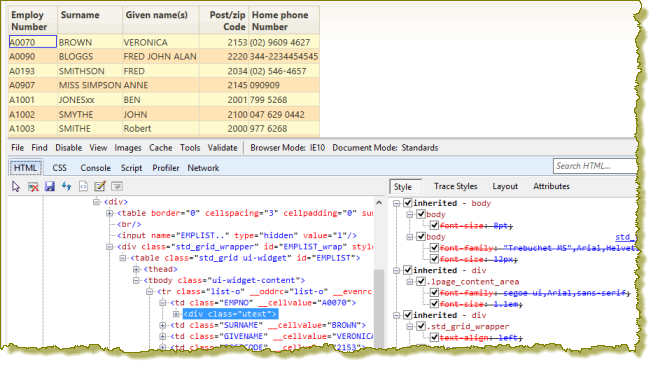
Note that the Select element by click click  icon in Developer Tools can be used to select the element on the page that you want to examine.
...
- A list is wrapped by a DIV with the class of std_grid_wrapper.
- The DIV also has an id of <listname>_wrap, where <listname> is the name of the list in the RDMLX.
- For a grid, the wrapper DIV also has a class of std_grid_wrapper. The id is LANSA_<gridname>wrapwhere <gridname> is the name assigned to the grid in the _ Design view.
- The DIV wrapper provides the size and position for the grid, drawing any scrollbars as necessary.
- In a list, the row class names are alternated between list-o and list-e.
- For a grid, the class names for odd and even rows are defined by the grid properties odd_row_class and even_row_class, which have default values of odd_row and even_row.
- A list's table cells (<td> tags) are given a class name of the field name. This provides a way to apply styles to specific columns.
- Input fields are given a class that represents the data type of the field. Fields of type alpha, char or string will be "text", "utext" or "ltext" depending on the input case of the field. Fields of type packed, signed, integer, float, date, time or datetime will have a class name of "number". Boolean fields will be "ltext" and all other fields will be "text".
...