Page History
...
- Open the command prompt:
No Format az login
- Login using an Azure account having a Microsoft Fabric subscription.
- Create a Database and ODBC DSN:
- Microsoft Fabric
- At least one schema available to use as a RED Data Warehouse Target.
- Microsoft Fabric
- Python 3.8 or higher
- Select "Add Python 3.8 to PATH" from installation Window.
- Pip Manager Install with command :
No Format python -m pip install --upgrade pip
- We recommend using case-insensitive (CI) collations during the creation of your Fabric Warehouse
Enablement Pack Setup Scripts
...
| No Format |
|---|
python -m pip install -r requirements.txt |
For upgrade of existing repository
Python requirements for offline install
Additionally to the base Python installation being required, the WhereScape Python Template set also requires certain additional Python libraries. The install scripts uses the PIP (package manager) to download these libraries, however for offline installs you will need to install the required libraries yourself.
Required Python libraries/add-ons:
- pywin32-ctypes
- python-tds
- pywin32
- glob2
- gzip-reader
- regex
- pyodbc
Restarting failed scripts
Some of the setup scripts will track each step and output the step number when there is a failure. To restart from the failed step (or to skip the step) provide the parameter "-startAtStep <step number>" to the script.
Example:
Powershell -ExecutionPolicy Bypass -File .\<script_file_name.ps1> -startAtStep 123
| Tip | ||
|---|---|---|
| ||
To avoid having to provide all the parameters again you can copy the full command line with parameters from the first "INFO" message from the beginning of the console output. |
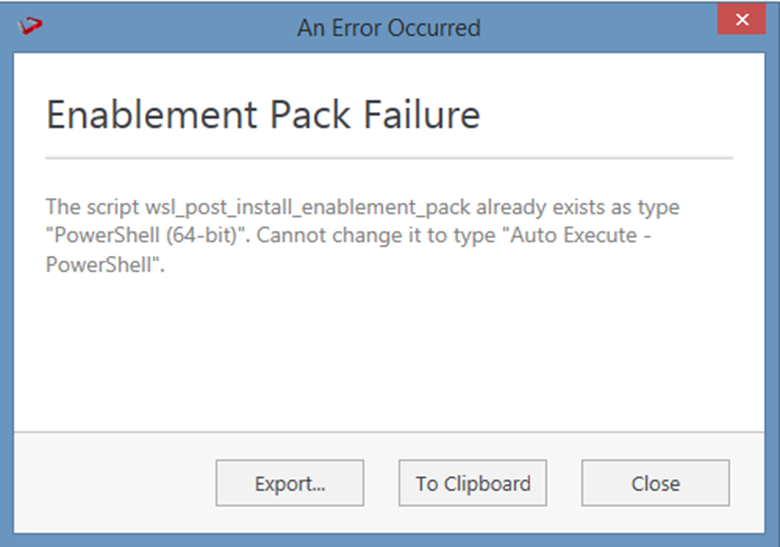
For upgrade of existing repository
In upgrade of exiting repository if the user gets above error then it means the script type In upgrade of exiting repository if the user gets above error then it means the script type of wsl_post_install_enablement_pack is set to PowerShell(64-bit) change the script type to Auto Execute-PowerShell before upgrade or manually run the wsl_post_install_enablement_pack script from host script from RED after upgrade.
...
While loading the table, the table name should be given in lowercase, for example, load_tablename; otherwise, loaded data will now get displayed.