Page History
Restarting a Job Via the Azkaban Scheduler Dashboard
Restarting a job can only be done via the Azkaban Scheduler Dashboard as there is currently no integration point for this action via the RED UI.
...
Next you are presented with the 'Execute Flow' screen which will show the graph of the tasks int eh in the flow, if you click execute now the flow will be restarted and the Job will be restarted from the last failure, thus skipping the already successful tasks.
...
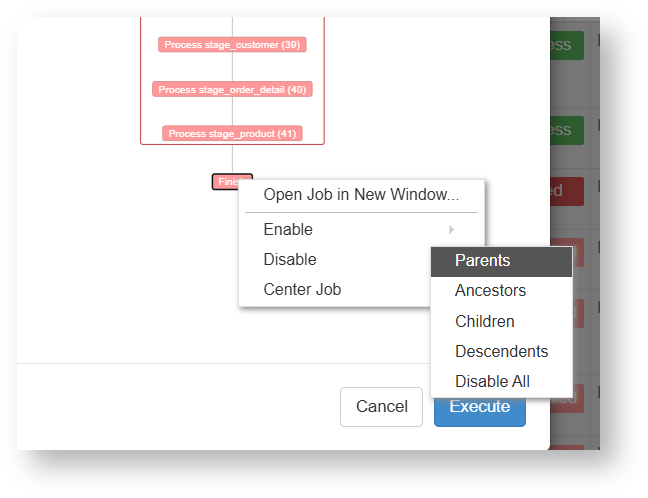
Additionally if you would like to simply run certain steps or the final step of a job via Azkaban Dashboard, then at this can be achieve achieved via the Execute Flow screen, by right clicking on the tasks in the flow view. See the following section for an example.
Synchronizing Jobs stuck in the running state in RED but finished in Azkaban
If a job is stuck in the running state in RED UI but completed in Azkaban then there was likely some communication problem with Azkaban and the RED PostgreSQL metadata database. To resolve the synchronization issue you can follow the process to restart the execution via Azkaban Dashboard and enable at least the last 'Finish' step again.
The below screenshot shows how to disable all parent task tasks of the Finish step of a failed job, which will result in the job only running that step. This is useful if you have a job in the RED UI which is out of sync with the Azkaban scheduler, for example if the job is stuck in the running state in RED UI but completed in Azkaban then this restart process will simply update the currently running job in the RED metadata with the final result and move it out of the running state in RED.
Editing a task's status directly in RED
You can also edit the Task status of a failed run in RED so that it is skipped or rerun when restarting from Azkaban.
To achieve this, before restarting the job in Azkaban, edit the status of the job in the RED Scheduler tab job tasks so that only certain tasks will be run again or be skipped over.
...