Page History
...
In RED 10 all Scheduling Actions for an Object are performed through an Action Processing Script which is built for and associated to each table, the RED Migration Tooling will generate this script for each object that requires one, or assign a generic script where appropriate, this generation process can take minutes to hours depending on the size of the metadata repository, machine resources and database performance.
...
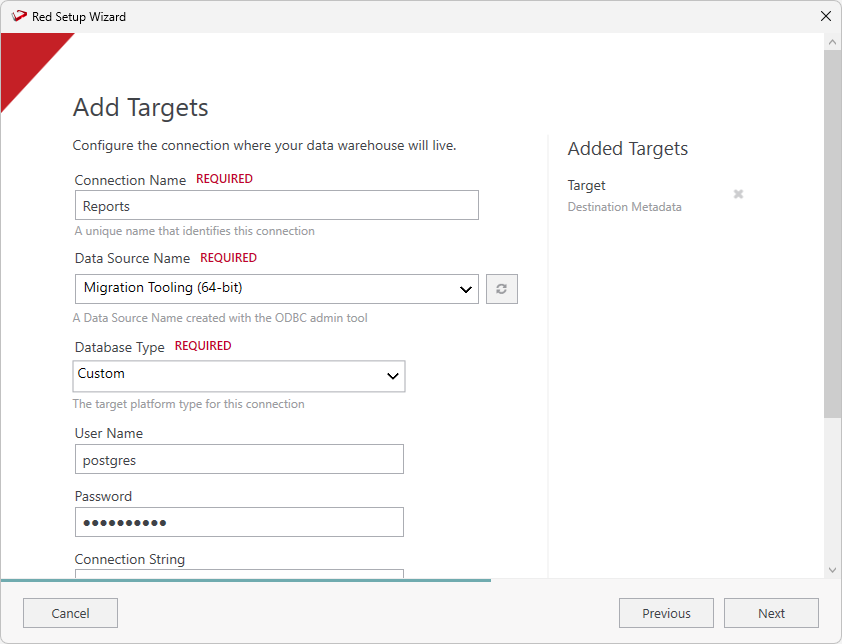
- On the Connection Name field, ensure you enter 'Reports' as the connection name.
- On the Data Source Name field, ensure you select the connection to the destination metadata repository.
- On the Target Storage Locations field, enter 'red' as the storage location.
- Complete the other fields with the appropriate data, then click Validate to check your configurations.
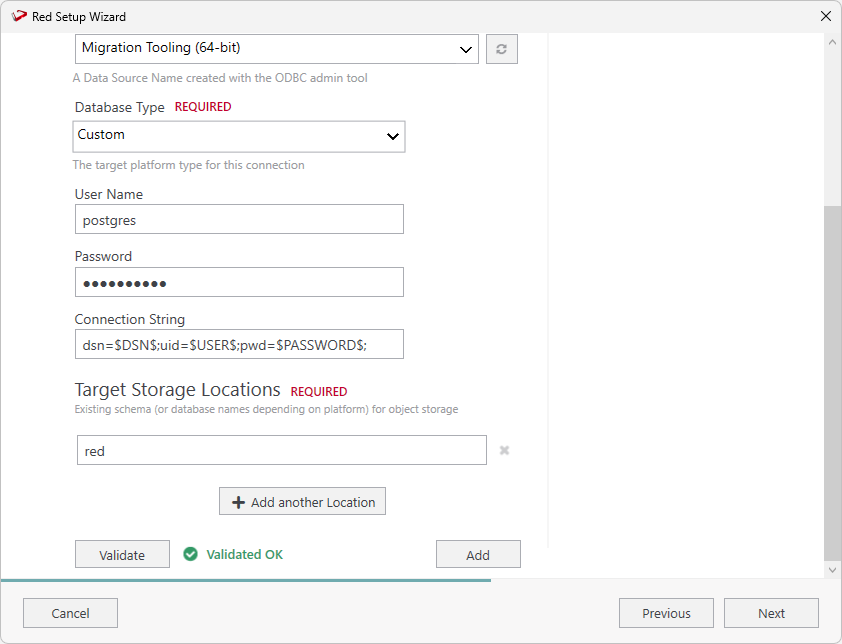
- Once you validate your configurations click Add.
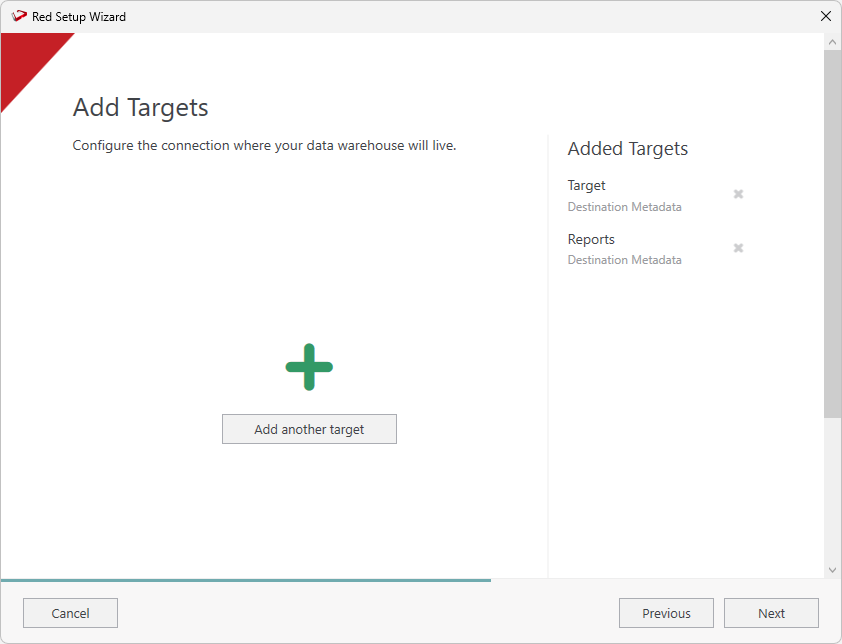
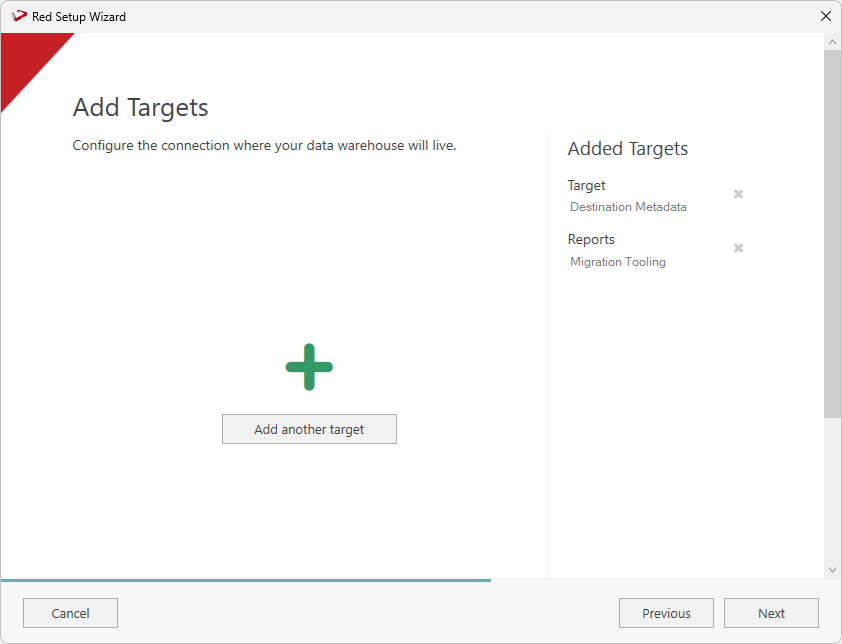
- On the Add Targets screen you will see the two connections you just added. Click Next continue and add the source connection.
Create the Source Metadata Connection
...
| Tip |
|---|
When asked for a Scheduler Metadata database use the RED Migration Tooling metadata database. When asked for a RED Metadata database also use the RED Migration Tooling metadata database. Remember your Profile Encryption Secret for later entry into the Scheduler Profile Maintenance wizard in the RED UI. If you install the Migration Tooling Scheduler with a separate service user then you may need to run the script 'wsl_mt_initialize_scheduler_user' to accept the EULA for that user. Find this script under the Host Scripts in RED and run it via the Scheduler to accept the EULA for the Scheduler user. |
Configure the Scheduler Credentials in RED
...
Generates Load routines for Load objects without an associated script. It can also be run from the RED UI, before running this job see the script details for the scripts prefixed with 'c'.
Repeating or Restarting the Migration
To repeat the migration process a second time you do not need to reinstall the Migration Tooling, you can simply drop follow these steps:
- Drop and recreate the Destination PostgreSQL database,
...
- Run script '2_target_repo_creation'
...
- - to recreate the Destination metadata repository.
- Then run the jobs again in the order specified.
If you are also upgrading the tooling please follow the upgrade process in the release notes pertaining to your version.
Migration Scripts Explained
| Note | ||
|---|---|---|
| ||
Since the tooling spans many supported version of RED the Load tables in the tooling may not have newer metadata columns for some tables, therefore the only supported way to recreate the load tables of the tooling is to follow the steps above, so that the metadata creation process creates the correct metadata tables for your target RED version. |
Migration Scripts Explained
These are the Migration These are the Migration Tooling Scripts, each script can be run from the RED UI or via the indicated Scheduled Job. If you choose to run these scripts manually, please follow the order carefully as listed here.
...
- Sets up required parameters for the tooling.
- Deploys RED Applications containing the RED Objects and Jobs for the Migration Tooling
If you have not set up the required connections, the Results pane will display a failure message similar to the image shown below. Please expand the Connections node in the left tree and add or amend connections as required before rerunning the script.

| Tip | ||
|---|---|---|
| ||
| If you do add or adjust connections at this point, then ensure you 'Save your Connection Profile' and restart RED so that the in-memory profile of connections credentials is up to date |
...
| and then re-run this script manually to ensure that RED Applications containing the RED Objects and Jobs for the Migration Tooling are deployed correctly. |
2_target_repo_creation
- Creates the RED metadata in the Destination PostgreSQL database.
...
- This script is driven by the two parameters 'red10DefaultLinuxActionScriptName' and 'red10DefaultWindowsActionScriptName'.
- This script runs a set a queries to determine candidate objects for a generic action script and then uses the parameters above to assign a default generic action scrip to those objects.
- The Migration Tooling provides two sample generic action processing scripts which are copied across to the Destination metadata and then used in these assignments.
- The sample sample generic action processing scripts are 'wsl_mt_py_action_script' for python and 'wsl_mt_ps_action_script' for powershell.*
- If you have your own generic action processing script in the target to assign you can set in in these parameters.
- To disable this process and have all object's action scripts regenerated later, you can remove the script names from these parameters.
...
- Review and adjust job thread counts: The migration process capped the total thread count in jobs to 10 since this is the typical parallelism which is possible on an average machine due to memory consumption. You can begin to set this higher as your infrastructure allows.
- Review Jobs with Child Jobs: In RED 10.4.0.3 a child jobs tasks are run directly from the original job they reference, if you change a child jobs tasks then this may invalidate the parent jobs references to it which can only be fixed by re-publishing the parent job. Improved Child Job support is coming soon but until then use job nesting sparingly to avoid synchronization issues.
- If you were previously running a RED8/9 Linux scheduler then you should install an Azkaban Executor on the same machine and Linux user. If the previous workloads can not be handled on the same machine with the Azkaban Executor installed then you would scale out horizontally with more Azkaban Executor machines.
Review and Refactor
- out horizontally with more Azkaban Executor machines.
Review and Refactor
Template Generated Scripts
Some earlier versions of enablement packs, particularly Snowflake PowerShell Load templates, have specific code in them to call the the SQL Server metadata. These will require identifying and either transformations applied or regeneration of those scripts using RED 10 templates.
To identify calls to WslMetadataServiceDLL in scripts which point to SQL Sever metadata you can run this query, post migration these scripts will need an Update SQL applied (shown later) or the script regenerated using RED 10 templates.
| Code Block | ||||||
|---|---|---|---|---|---|---|
| ||||||
-- RED 10 PostgreSQL Query (run post migration)
SELECT DISTINCT sl_obj_key AS key, sh_name AS name
FROM red.ws_scr_header JOIN red.ws_scr_line ON sl_obj_key = sh_obj_key
WHERE
	UPPER(sl_line) LIKE UPPER('%WslMetadataServiceClient%dbo%')
 	OR
	UPPER(sl_line) LIKE UPPER('%WslMetadataServiceClient%SQLServer%')

-- RED 8/9 SQL Server Query (run pre migration to analyze the source metadata)
SELECT DISTINCT sl_obj_key AS 'key', sh_name AS 'name'
FROM dbo.ws_scr_header JOIN dbo.ws_scr_line ON sl_obj_key = sh_obj_key
WHERE
	UPPER(sl_line) LIKE UPPER('%WslMetadataServiceClient%dbo%')
 	OR
UPPER(sl_line) LIKE UPPER('%WslMetadataServiceClient%SQLServer%') |
| Code Block | ||||||
|---|---|---|---|---|---|---|
| ||||||
-- RED 10 PostgreSQL update to correct calls to the WslMetadataServiceClient in Scripts
UPDATE red.ws_scr_line
SET sl_line = REGEXP_REPLACE(
                  REGEXP_REPLACE(
                      sl_line,
                      '(WslMetadataServiceClient.*)SqlServer',
                      '\1PostgreSQL',
                      'ig'
                  ),
                  '(WslMetadataServiceClient.*)dbo'
                  ,'\1red'
                  ,'ig'
              );

-- RED 10 PostgreSQL update to correct calls to the WslMetadataServiceClient in Templates
UPDATE red.ws_tem_line
SET tl_line = REGEXP_REPLACE(
                  REGEXP_REPLACE(
                      tl_line,
                      '(WslMetadataServiceClient.*)SqlServer',
                      '\1PostgreSQL',
                      'ig'
                  ),
                  '(WslMetadataServiceClient.*)dbo'
                  ,'\1red'
                  ,'ig'
); |
| Anchor | ||||
|---|---|---|---|---|
|
...
If the only RED 10 WhereScape Target Enablement Pack you have available was released prior to this version of the migration tooling then it will be missing code to deal with the RED8/9 legacy script output protocol required after a migration to avoid having to rebuild every script. If this is the case then you can update you your Action Processing Script Template's execute script function directly. This should be performed prior to the action script generation tasks in Jobs 5 and 6 or the scripts beginning with 'c<n>_' if running the tasks manually.
...
You can replace the functions in each of your PowerShell and Python templates depending on what your enablement provides. After making you your changes you should test by manually regenerating the Action Processing Script on a few of your objects in the Destination Repo prior to running the batch generation jobs. The updated functions are as follows:
...
| Code Block | ||||||
|---|---|---|---|---|---|---|
| ||||||
def ExecuteScript(name):
    env = dict(os.environ)
    # Environment variables specific to the script (e.g. WORKDIR, which comes
    # from the script's connection) are stored prefixed. We copy such variables
    # to their unprefixed name.
    prefix = 'WSL_SCRIPT_{}_'.format(name)
    command = os.getenv(prefix + 'COMMAND')
    if ( not command ) or ( sys.argv[0] in command ):
        raise Exception("No Script or SQL Block found for routine {}".format(name))
    write_detail("Executing command: {}".format(command))
    for var in os.environ:
        if var.startswith(prefix):
            unprefixedvar = 'WSL_' + var[len(prefix):]
            #write_detail("Overriding environment: {} -> {}".format(var, unprefixedvar))
            env[unprefixedvar] = os.environ[var]
    # Ensure our work directory is valid and default to script root if not
    env['WSL_WORKDIR'] = os.getenv('WSL_WORKDIR','Work_Directory_Not_Set')
    if not os.path.exists(env['WSL_WORKDIR']):
        # default to script root
        env['WSL_WORKDIR'] = os.path.dirname(sys.argv[0])
        write_detail("Overriding environment: {} -> {}".format('WSL_WORKDIR', env['WSL_WORKDIR']))
    if os.path.exists(command) and os.path.splitext(command)[1] == '.sql':
        # We have an sql block not a script
        with open(command, 'r', encoding='utf-8') as f:
            block = f.read()
            result = ExecuteSQLBlock(block)
        if result == True:
            write_detail("Executed SQL Block")
    else:
        legacy_script = False
        if '$WSL_EXP_LEGACY_SCRIPT_SUPPORT$' == 'TRUE' or '$PLEGACY_SCRIPT_SUPPORT$' == 'TRUE':
            # Parse output for LEGACY_SCRIPT_SUPPORT if the matching extended property or parameter is TRUE
            result = subprocess.run(command, shell=True, env=env, capture_output=True, text=True)
            return_code = result.returncode if result.returncode < 2**31 else result.returncode - 2**32
            if result.stdout:
                stdout_lines = result.stdout.splitlines()
                if stdout_lines[0] in ['1','-1','-2','-3']:
                    legacy_script = True
                    write_detail("Parsing legacy script output protocol.")
                    # We have legacy script output protocol
                    legacy_returncode = stdout_lines[0]
                    if legacy_returncode in ['-2','-3']:
                        # error
                        return_code = 2
                        if stdout_lines[1]:
                            write_audit(stdout_lines[1],'audit','E')
                    elif legacy_returncode == '-1':
                        # success with warning
                        return_code = 0
                        if stdout_lines[1]:
                            write_audit(stdout_lines[1],'audit','W')
                    elif legacy_returncode == '1':
                        # success
                        return_code = 0
                        if stdout_lines[1]:
                            write_audit(stdout_lines[1],'audit','I')
                    for line in stdout_lines[2:(len(stdout_lines))]:
                        write_audit(line)
                else:
                    write_detail("Using new script output protocol")
                    # First line didn't conform to legacy script output protocol
                    # so assume we have new output protocol and just pass stdout through
                    for line in stdout_lines:
                      print(line, flush=True)
        else:
            # Assume that we can just pass all the output from the script as our output
            # and the return code indicates success/failure
            result = subprocess.run(command, shell=True, env=env, stderr=subprocess.PIPE, text=True)
            return_code = result.returncode if result.returncode < 2**31 else result.returncode - 2**32
        if result.stderr != "":
            write_audit(str(result.stderr),'detail','E')
        if ( (result.stderr != "" and not legacy_script) or ( str(return_code) != "0" ) ):
            # Finally signal a failure if one occured.
raise Exception("Script execution failed with exit code: {}. Check both audit and detail logs.".format(return_code)) |
...