In this step you create a custom Framework manager to handle requests to change the background panel. To do this, display the Common Activities for the Framework and choose Create an IIP and a custom framework manager. Choose Create Only.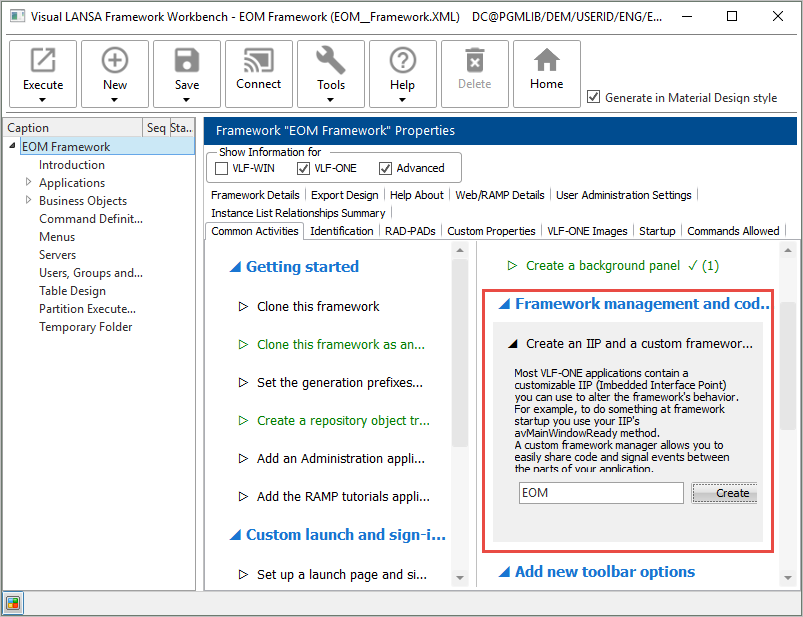
When the components have been created and snapped in, switch to the Visual LANSA editor and open your repository tracking list (see Create a Repository List to Track the Things You Create).
A custom IIP and a custom manager have been created for the Framework: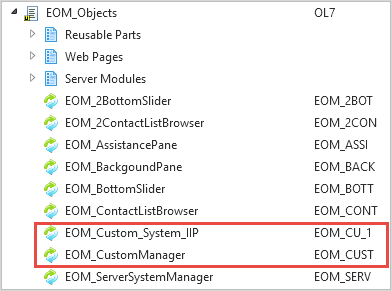
The custom IIP specifies the custom manager to be used.
Open the custom manager (XXX_CustomManager) and replace its source code with this code:
Begin_Com Role(*EXTENDS #VF_AC036O)

Define_Evt Name(ChangeBackgroundImage)
Define_Map For(*input) Class(#PRIM_ALPH) Name(#ImageName)

Define_Evt Name(ChangeBackgroundTextStyle)
Define_Map For(*input) Class(#PRIM_vs.Style) Name(#ToStyle) Pass(*BY_REFERENCE)

Mthroutine Name(RequestChangeBackgroundImage)
Define_Map For(*input) Class(#PRIM_ALPH) Name(#ImageName)
Signal Event(ChangeBackgroundImage) Imagename(#ImageName)
Endroutine

Mthroutine Name(RequestlChangeBackgroundTextStyle)
Define_Map For(*input) Class(#PRIM_vs.Style) Name(#ToStyle) Pass(*BY_REFERENCE)
Signal Event(ChangeBackgroundTextStyle) Tostyle(#ToStyle)
Endroutine

End_Com
The custom manager now defines ChangeBackGroundImage and ChangeBackgroundTextStyle events which it signals when requested.
Compile and close the custom manager.