1. Click on the Package Settings button on the toolbar to display the
package Settings window.

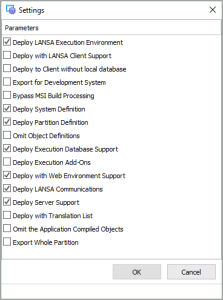
2. We recommend these settings for most systems, please ensure they are
approriate for your environment.
3. Click OK to close the Settings.
1. Click on the Package Settings button on the toolbar to display the
package Settings window.
2. We recommend these settings for most systems, please ensure they are
approriate for your environment.
3. Click OK to close the Settings.