2.2.1 Create Fields
To create a field use the New command.
The New field dialog is displayed:
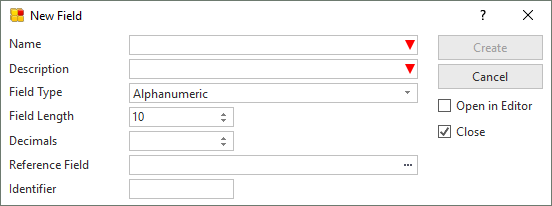
- Specify the Field Name, Description, and other details of the new field that is to be created. Refer to Field Definitions for details of these entries.
- Select the Open in editor option if you wish to specify additional field details.
- Select the Close option if you do not want the New Field dialog to reappear.
- When the required details have been specified, use Create to create the new field.
If you want the field that you are creating to permanently inherit the characteristics of another field, specify a Reference Field.
Fields must be defined in the Repository before they can be used in tables, functions, forms or reusable parts.
Also See
Fields in the Technical Reference Guide
Field Definitions in the Technical Reference Guide
Developing with Fields in the Developer Guide
⇑ 2.2 Fields