WAM070 - Hiding Techniques
In this step, you will set up the web page for the HideMain WebRoutine in the Design view.
1. Open the HideMain WebRoutine in the Design view.
2. Use the context menu, Insert HTML / Table to add a 3 row by 3 column table to the page.
3. Select the table and set the table's width property to 80%.
4. Set the align property of each individual cell to center.
5. Set the class property of each cell in the top row to bold.
6. Add text, to clarify the technique used, to each of the three cells in the top row. The headings should be Hidden Class, hide_if, and xsl:if.
7. Add a Combo box weblet to each of the three cells in the middle row.
8. Add a Push button weblet to each of the three cells in the bottom row.
9. Configure the three Hide/Show Push buttons using this table.
Property | Value | |
caption | Hide/Show | |
on_click_wrname | HideMain | |
Table Column 1 | submitExtraFields | Field Name: STDRENTRY |
Literal Value: A | ||
Table Column 2 | submitExtraFields | Field Name: STDRENTRY |
Literal Value: B | ||
Table Column 3 | submitExtraFields | Field Name: STDRENTRY |
Literal Value: C |
The Design view should appear something like the following:
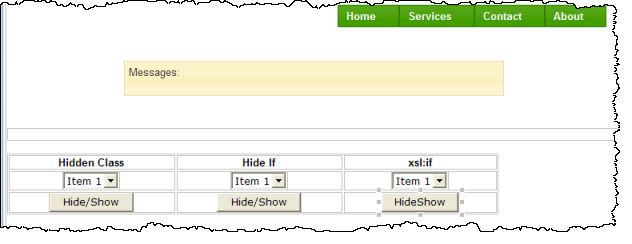
10. Save your changes.