フィールド名
EMPNO(Alpha 5)
説明
フィールドをグリッド内にプロンプタつき編集ボックスとして表示します。
標準的な編集ボックスに、プロンプタを添えて表示することができます。まず、プロンプタを作成します。プロンプタ・フォームは次の条件を満たさなければなりません。
- デフォルトのプロパティが設定されていること
- (OKボタンを押すなどにより)画面を閉じたとき、Modalresult(ok)を返すような仕組みがあること
サンプルの作成方法
- EMPNOPRMTというフォームを作成し、下記に示す、プロンプタのコードを貼り付けてください。
- コンポーネント・エディターでEMPNOフィールドを開き、下記に示す、フィールドのコードを貼り付けてください。
- フォームを作成し、下記に示す、フォームのコードをコピーしてください。
- これをコンパイル、実行します。
動作:
作成したプロンプタ・フォームはガイドラインに従っていなければなりません。以下のようにプロパティを設定し、これをフォームの省略時プロパティとしてください(例:Defaultpty(p_Employee_number))。
Define_Pty Name(p_Employee_number) Get(*auto #empno) Set(set_empno)
ユーザーが (F4キーやの省略記号 (...) ボタンを押して) プロンプタを起動した時、このプロパティ一式が呼び出されます。フィールド値が設定されます。これを利用すると、実際にプロンプタ・フォームを表示する前に、正しい社員が選択されているかどうか確認することができます。
応答を要求するフォームが表示されます。ここで新しい社員を選択してOKボタンを押すと、フォームは画面から消えます。その後、OKボタンのハンドラーが、フォームのModalresultをokと設定します(Modalresult(ok))。これはフィールドに対して、処理が正常に終了し、新しい社員が選択された旨を通知するものです。逆にModalresultが未設定であれば、ユーザーがキャンセルしたため、新しい値に対する処理は必要ないことを表します。
最後に、省略値プロパティを参照してプロンプタの値を調べ、新しい値になるよう表示を更新します。
プロンプタのソース
Function Options(*DIRECT)Begin_Com Role(*EXTENDS #PRIM_FORM) Defaultpty(p_Employee_number) Clientheight(463) Clientwidth(656) Formstyle(Owned) Height(490) Layoutmanager(#LAYOUT2) Left(330) Popupmenu(#PMNU_1) Top(127) Width(664) Define_Com Class(#PRIM_GPBX) Name(#GPBX_2) Caption('All Employees ') Displayposition(1) Height(463) Layoutmanager(#LAYOUT1) Left(0) Parent(#COM_OWNER) Popupmenu(#PMNU_1) Tabposition(1) Tabstop(False) Top(0) Width(656) Define_Com Class(#PRIM_LTVW) Name(#LISTVIEW) Displayposition(1) Height(402) Left(6) Parent(#GPBX_2) Popupmenu(#PMNU_1) Tabposition(1) Top(15) Width(644) Define_Com Class(#PRIM_LVCL) Name(#LVCL_1) Caption('First Name') Captiontype(Caption) Displayposition(1) Parent(#LISTVIEW) Sortonclick(True) Source(#GIVENAME) Width(35) Define_Com Class(#PRIM_LVCL) Name(#LVCL_2) Caption('Last Name ') Captiontype(Caption) Displayposition(2) Parent(#LISTVIEW) Sortonclick(True) Source(#SURNAME) Width(50) Widthtype(Remainder) Define_Com Class(#PRIM_LVCL) Name(#LVCL_3) Parent(#LISTVIEW) Source(#EMPNO) Visible(False) Width(20) Define_Com Class(#PRIM_ATLM) Name(#LAYOUT1) Define_Com Class(#PRIM_ATLI) Name(#IL301) Attachment(Center) Manage(#LISTVIEW) Marginbottom(2) Marginleft(2) Marginright(2) Margintop(2) Parent(#LAYOUT1) Define_Com Class(#PRIM_SPLM) Name(#LAYOUT2) Orientation(Vertical) Define_Com Class(#PRIM_SPLI) Name(#IS102) Manage(#GPBX_2) Parent(#LAYOUT2) Weight(1) Define_Com Class(#PRIM_PMNU) Name(#PMNU_1) Define_Com Class(#PRIM_MITM) Name(#HSPLIT) Caption('Split Form Horizontally') Displayposition(1) Parent(#PMNU_1) Define_Com Class(#PRIM_MITM) Name(#VSPLIT) Caption('Split Form Vertically') Displayposition(2) Enabled(False) Parent(#PMNU_1) Define_Com Class(#PRIM_PANL) Name(#PANL_1) Displayposition(2) Height(40) Left(4) Parent(#GPBX_2) Tabposition(2) Tabstop(False) Top(419) Width(648) Define_Com Class(#PRIM_ATLI) Name(#ATLI_1) Attachment(Bottom) Manage(#PANL_1) Parent(#LAYOUT1) Define_Com Class(#PRIM_PHBN) Name(#PB_OK) Buttondefault(True) Caption('&OK') Displayposition(1) Left(208) Parent(#PANL_1) Tabposition(1) Top(8) Define_Com Class(#PRIM_PHBN) Name(#PHBN_2) Buttoncancel(True) Caption('&Cancel') Displayposition(2) Left(296) Parent(#PANL_1) Tabposition(2) Top(8) Group_By Name(#TREEITEMS) Fields(#DEPTMENT #DEPTDESC #SECTION #SECDESC #EMPNO #FULLNAME) Define_Pty Name(p_Employee_number) Get(*auto #empno) Set(set_empno) Ptyroutine Name(set_empno) Define_Map For(*input) Class(#empno) Name(#employee) Selectlist Named(#LISTVIEW) Continue If('#Employee *ne #empno') Set Com(#listview.currentitem) Focus(true) Selected(true) Endselect Endroutine Evtroutine Handling(#com_owner.CreateInstance) Set Com(#com_owner) Caption('Employee Browser/Selector') * Change Field(#TREEITEMS) To(*NULL) * Select Fields(#DEPTMENT #SECTION #EMPNO #SURNAME #GIVENAME) From_File(PSLMST) Select Fields(#LISTVIEW) From_File(PSLMST) Fetch Fields(#DEPTDESC) From_File(DEPTAB) With_Key(#DEPTMENT) Keep_Last(50) Fetch Fields(#SECDESC) From_File(SECTAB) With_Key(#DEPTMENT #SECTION) Keep_Last(50) Use Builtin(BCONCAT) With_Args(#GIVENAME #SURNAME) To_Get(#FULLNAME) Add_Entry To_List(#LISTVIEW) Set Com(#ListView.currentitem) Image(#vi_employ) Endselect Endroutine Evtroutine Handling(#VSPLIT.Click) Set Com(#layout2) Orientation(vertical) Set Com(#VSplit) Enabled(False) Set Com(#HSplit) Enabled(True) Endroutine Evtroutine Handling(#HSPLIT.Click) Set Com(#layout2) Orientation(horizontal) Set Com(#HSplit) Enabled(False) Set Com(#VSplit) Enabled(True) Endroutine Evtroutine Handling(#PB_OK.Click) Invoke Method(#COM_OWNER.CLOSEFORM) Set Com(#com_owner) Modalresult(ok) Endroutine End_Com
フィールドのソース
Begin_Com Role(*EXTENDS #PRIM_OBJT)Begin_Com Role(*Visual #PRIM_EVEF) Name(#ENTRYFIELD) Defaultvisual(True) Height(19) Usepicklist(False) Width(209) End_Com Begin_Com Role(*prompter #EMPNOPRMT) Name(#PROMPTER) Defaultprompter(True) End_Com End_Com
フォームのソース
Function Options(*DIRECT)Begin_Com Role(*EXTENDS #PRIM_FORM) Clientheight(147) Clientwidth(492) Height(174) Left(369) Top(152) Define_Com Class(#PRIM_GRID) Name(#GRID) Captionnoblanklines(True) Componentversion(1) Displayposition(1) Height(128) Left(41) Parent(#COM_OWNER) Showbuttonselection(True) Showselection(True) Showselectionhilight(False) Showsortarrow(True) Tabposition(1) Top(9) Width(344) Define_Com Class(#PRIM_GDCL) Name(#GDCL) Displayposition(1) Parent(#GRID) Readonly(False) Source(#EMPNO) Width(30) Evtroutine Handling(#COM_OWNER.CreateInstance) Options(*NOCLEARMESSAGES *NOCLEARERRORS) Select Fields(#SECTION) From_File(PSLMST) Add_Entry To_List(#GRID) Endselect Endroutine End_Com
外観
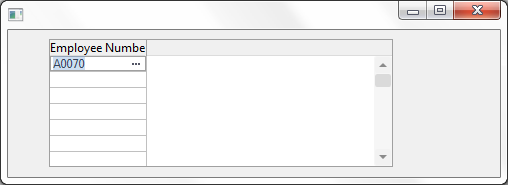
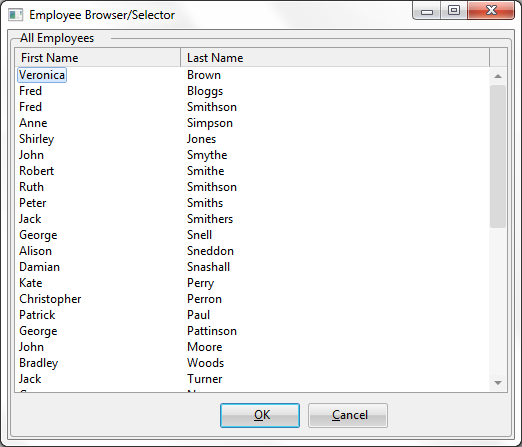
注:
OKボタンのハンドラーには次のような行があります。これは、プロンプタが正常に閉じたこと、新しい値が選択されたことを、呼び出し元フィールドに通知するものです。
Set Com(#com_owner) Modalresult(ok)
この行がなければ、呼び出し元フィールドではプロンプタが正常終了しなかったものとみなすので、新しい値に対する処理は行いません。