Step

Activity                                   

How to Do It

OK

Assign a build number

Assign a build number nn to the version of your product being released. This number will be used in the following steps for a file naming convention.


Save your Framework definition file

You need to create a save file for the Framework definition.

See Generate VLF-ONE or VLF-Web Resources in the Framework guide for instructions of how to copy the DAT file to the IFS if it is not there already.

The Framework definition file will have the form XXXXXXXXX_LLLL_VLFONE_Definition.DAT where XXXXXXXXX is the Framework name and LLLL is the language.


Include your own non-LANSA objects when required

If your application contains non-LANSA objects, create save files containing them.

Create as many IBM I save files named Bnn_OM1, Bnn_OM2, etc. as required to contain other non-LANSA IBM I objects.

Save all non-LANSA objects into the Bnn_OM1, 2, 3 … n save files using the SAVOBJ command.


Create an IBM I Export List

Create a LANSA export list named Bnn_ALL.

Use the option Work with lists of objects to be exported of the LANSA Housekeeping menu to create the export list.

Note that if your deployment package does not contain files, you can simply move your save files to the target system without using Import/Export.


Include your files in the export

If you want to include files in the deployment package, add them to the export.

Include the data in the files.

If you are using Framework Users and Authorities, export files VFPPF06 and VFPPF07.


Include save files in the export list

Include the save files you have created in the export list.

Use option Add other/non-LANSA objects to the list.

Use F20 to find the files.


Include all the standard Framework objects in the export list

Use F8 to make generic selections when adding objects to the export list.


Processes/functions:

VF_PR001/VFU0012


Other/non-LANSA: (Type *SRVPGM)

U_BIF985


Visual LANSA components:

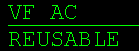
VF_AC* - filter by type REUSABLE:


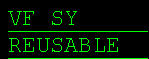
VF_SY* - filter by type REUSABLE:


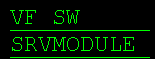
VF_SW* - filter by type SRVMODULE:


VF_FP501O 


Include all your own LANSA objects in the export list

Add your objects (filters, command handlers etc.), multilingual text variables, system variables, message files, files, processes, functions and images used in the application.

Make sure you include your custom snap-in components. For more information please refer to VLF-ONE Snap-In Points Summary in the Framework Guide.


Review the export list and make sure included objects are exported compiled (if applicable).

Specify Y in the Comp Form column of processes, functions, VL components etc.

Save the list (F19).


Export the list


Create a save file Bnn_ALL for your export list using the CRTSAVF command.

CRTSAVF Bnn_ALL

Export your export list to the save file using option 7 (= Export) in the Work with Export Lists menu.