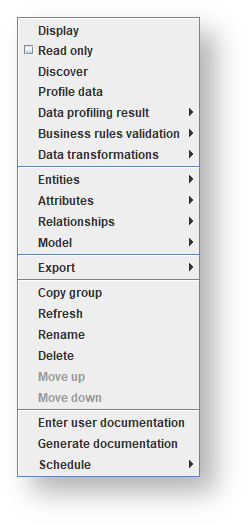
Menu | Description | |
|---|---|---|
Display | Refer to Displaying a Model Version for details. | |
Read only | Refer to Setting a Model Version as Read Only for details. | |
Discover | Refer to Running Discovery for details. | |
Profile data | Refer to Running Profiling for details. | |
Data profiling result | Select one of the following options:
| |
Business rules validation | Select one of the following options:
| |
Data transformations | Test data transformation queries - Refer to Testing Data Transformation Queries for details. | |
Entities | Select one of the following options:
| |
Attributes | Select one of the following options:
| |
Relationships | Select one of the following options:
| |
Model | Select one of the following options:
| |
Export | Select one of the following options:
| |
Copy group | Refer to Creating a New Group for details. | |
Refresh | Click to refresh the group contents. | |
Rename | Click to display a dialog to let you enter a new name for the group. | |
Delete | Click to delete the group. It's contents are not deleted from the model. Refer to Deleting a Group for details. | |
Move up | Click to move the group up one position in the tree.
| |
Move down | Click to move the group down one position in the tree.
| |
Enter user documentation | Refer to Adding Details for Documentation for details. | |
Generate documentation | Refer to Generating Documentation for details. | |
Schedule | Select one of the following options:
|