In Enablement Pack versions greater than the following, the use of SnowSQL* has been removed in favor of ODBC only, this change allows for a single point of authentication configuration for Snowflake and RED.
- RED 10.2+ EP Build 250904-1855 and higher
- RED 9.0 EP Build 250911-1939 and higher
For earlier versions of RED, the EP, or for existing PowerShell scripts which you do not want to rebuild, consider changing all RED SnowSQL calls to ODBC, to simplify authentication configuration, by using the method described here.
*Note: Snowflake have deprecated SnowSQL in favor of Snowflake CLI, but RED only requires ODBC alone.
The following guide applies to RED Template Type: PowerShell only
All required connection attributes need to be set in snowsql.conf file, SnowSQL command line parameters and environment variables.
RED Snowflake PowerShell Template Limitations
RED PowerShell scripts set SnowSQL environment variables but only cater for a limited set covering the requirements for user/pwd authentication.
If using a SnowSQL authentication method outside of user/pwd then those required settings must be specified in your snowsql.conf and any required password set as the appropriate environment variable.
RED does not provide a way to dynamically alter the command arguments for SnowSQL this means:
Only the default snowsql.conf can be used, since we can’t specify the SnowSQL connection name nor allow setting a different snowsql.conf path.
Therefore each Windows user would set up their own snowsql.conf file.
There is a 128 char limit on the RED Legacy Connect password field length so PAT’s and other long Tokens can’t be stored in the metadata (limit does not apply to RED connections using Advanced Connect).
SnowSQL Key Pair
Connecting through SnowSQL | Snowflake Documentation
Snowflake Key Pair auth with SnowSQL requires the following settings:
authenticator= SNOWFLAKE_JWTSet either in the snowsql.conf file or as a command line parameter.
Can not be set in RED.
private-key-path= Path to private key file.Set in the snowsql.conf file, as a command line parameter.
Can not be set in RED.
private_key_passphrase =passphrase for protected private key file [required when private key is protected]Set by environment variable only
SNOWSQL_PRIVATE_KEY_PASSPHRASECan not be set in RED OOTB, but can be set via HSL command-line hack.
username= Snowflake User.Set either in the snowsql.conf file, as a command line parameter or environment variable.
RED currently uses the environment variable method.
Set via RED - you can use the normal “Username” field in your connections.
Example configuration and test:
Add these snowsql.conf entries at the default level:
accountname = my_org
username = my_user_name
authenticator = snowflake_jwt
private_key_path = C:\Users\Administrator\snowflake_rsa_key.p8
Add your environment variable for the private key passphrase (if required) and run a test:
set SNOWSQL_PRIVATE_KEY_PASSPHRASE=myP@ssw0rd
snowsql -q "select 1"
Adding the private key passphrase environment variable
Since SNOWSQL_PRIVATE_KEY_PASSPHRASE environment variable is required for protected private keys any scripts using SnowSQL and Key Pair will need this variable set.
Method 1 - Adjusting the PowerShell Host Script Language Definition in RED
Use the DSS User Password field of your Windows Runtime connection in RED to hold the key file passphrase. This will be set as WSL_PWD environment variable in scripts (only valid in RED 9.0.x.x and below).
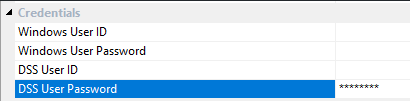
Then adjust your PowerShell Host Script Language Definition in RED to have the following command that uses the DSS User Password to set SNOWSQL_PRIVATE_KEY_PASSPHRASE.
PowerShell -ExecutionPolicy Bypass -Command "$env:SNOWSQL_PRIVATE_KEY_PASSPHRASE=$env:WSL_PWD; PowerShell -ExecutionPolicy Bypass -File '$SCRIPT_NAME$'"
Method 2 - Add the environment variable machine wide:
You could also add the environment variable at a machine level via Windows System Properties - Environment Variables
Method 3 - Start RED UI with a script that prompts for and sets the environment variable:
Use a simple batch or PowerShell script, launched via a desktop shortcut, that prompts for any required Snowflake environment variables then sets them for the session and launches RED under that session thus inheriting the environment variables set by the script.
SnowSQL MFA
Theoretically MFA caching is possible with SnowSQL but this can be problematic to implement. Instead WhereScape recommends moving SnowSQL calls to ODBC via this method or choosing a different method of authentication.
Connecting through SnowSQL | Snowflake Documentation
Gathering your accounts configuration settings.
SnowSQL PAT
Snowflake PAT authentication with SnowSQL requires the following settings:
username= Snowflake User.Set either in the snowsql.conf file, as a command line parameter or environment variable.
RED currently uses the environment variable method and sets SNOWSQL_USER.
Can be set via RED - you can use the normal “Username” field in your connections.
password= Snowflake PAT.Set either in the snowsql.conf file, as a command line parameter or environment variable.
RED currently uses the environment variable method and sets SNOWSQL_PWD.
Can be set via RED
Advanced Connect - you can use the normal “Password” field in your connections.
Legacy Connect - you must set this via snowsql.conf file due to field length limitation in Legacy Connect for RED
Migrate RED SnowSQL calls to Snowflake ODBC
When WhereScape originally wrote the PowerShell templates for Snowflake the Snowflake ODBC driver had limited functionality so some of the operations required for loading, such as uploading files to Snowflake, were only available via SnowSQL. Now all the features that RED utilized SnowSQL for can be performed through the Snowflake ODBC driver directly.
Since all RED PowerShell Templates produce scripts which import the common module ‘WslPowershellCommon’ there is opportunity to change the behavior of all existing scripts such that calls to SnowSQL are instead converted to calls via ODBC, thus eliminating the need to configure authentication aspects in both SnowSQL and ODBC.
The common modules are usually installed here: ‘C:\ProgramData\WhereScape\Modules\WslPowershellCommon’ or in later Enablement Packs the common modules are stored as host scripts in the RED metadata.
To convert all SnowSQL calls to ODBC, add this code to the WslPowershellCommon module on all machines running RED or the RED Scheduler:
function snowsql-to-odbc{
  # This function takes snowsql command line args and extracts the query arg,
  # the query is then executed via ODBC instead.
  # This code assumes RED snowsql commands have an arg of '-q' or '--query'
  # followed by the query to execute.
	if ($Args.Contains('-q')) {
		$query = $Args[$Args.IndexOf('-q')+1]
	}
	elseif ($Args.Contains('--query')) {
		$query = $Args[$Args.IndexOf('--query')+1]
	}
  # The output of Run-RedSQL is simply passed back to the caller,
  # if your custom scripts parse the snowsql formatted return then addtional coding
  # should be added here to translate the output of Run-RedSQL as required.
  Run-RedSQL -sql $query -dsn ${env:WSL_TGT_DSN} -uid ${env:WSL_TGT_USER} -pwd ${env:WSL_TGT_PWD} -odbcConn $tgtConn
}

# ** Warning ** - This code diverts all snowsql calls to ODBC
# If you have custom scripts which import this module and use snowsql
# then it is important to ensure your queries are supported via ODBC as well.
New-Alias -Name 'snowsql' -Value 'snowsql-to-odbc'