Field Name
SEX (Alpha 1)
Description
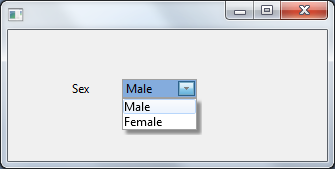
How to visualize a field as a ComboBox on a form.
Through the Field Component source add a Picklist visualization ( PRIM_EVPL ) and a Picklist. Note that these are separate classes in the Field source. Add PicklistItems for Male and Female to the Picklist and change the Appearance property of the PRIM_EVPL to DropDownList. Save the field and use the VisualPicklist class on a form.
Field Source
     BEGIN_COM ROLE(*EXTENDS #PRIM_OBJT)

     BEGIN_COM ROLE(*Visual #PRIM_EVEF) NAME(#VisualEdit) COMPONENTVERSION(1) HEIGHT(19) USEPICKLIST(False) WIDTH(178)

     End_Com

     BEGIN_COM ROLE(*picklist) NAME(#LIST)
     DEFINE_COM CLASS(#PRIM_PKIT) NAME(#ITEM1) CAPTION('Male') DEFAULT(True) PARENT(#LIST) VALUE('M')
     DEFINE_COM CLASS(#PRIM_PKIT) NAME(#ITEM2) CAPTION('Female') PARENT(#LIST) VALUE('F')
     End_Com

     BEGIN_COM ROLE(*Visual #PRIM_EVPL) NAME(#VisualPicklist) APPEARANCE(DropDownList) COMPONENTVERSION(1) DEFAULTVISUAL(True) HEIGHT(69) MARGINLEFT(50) WIDTH(125)

     End_Com

     END_COM
     End_Com
Form Source
     Function Options(*DIRECT)

     BEGIN_COM ROLE(*EXTENDS #PRIM_FORM) CLIENTHEIGHT(131) CLIENTWIDTH(319) HEIGHT(169) LEFT(440) TOP(196) WIDTH(335)
     DEFINE_COM CLASS(#SEX.Visual) NAME(#SEX) DISPLAYPOSITION(1) LEFT(64) PARENT(#COM_OWNER) TABPOSITION(1) TOP(24)


     End_Com
Appearance