It's finally time to write your RDMLX code.
You are going to use XPRIM_UriBuilder to build your URL, and XPRIM_RandomAccessJsonReader to read the JSON response.
Create a new server module called GoogleTranslateServerModule and declare the required fields:
     Begin_Com Role(*EXTENDS #PRIM_SRVM)

     End_Com
Define the following fields at the beginning:
     Define Field(#TargetLanguage) Type(*NVARCHAR) Length(10)
     Define Field(#SourceLanguage) Type(*NVARCHAR) Length(10)
     Define Field(#SourceText) Type(*NVARCHAR) Length(500)
     Define Field(#TranslatedText) Type(*NVARCHAR) Length(500)
     Define Field(#ErrorCode) Type(*NVARCHAR) Length(50)
     Define Field(#ErrorMessage) Type(*NVARCHAR) Length(200)
     Define Field(#OK) Type(*BOOLEAN)
Create a new server routine called Translate:
     Srvroutine Name(Translate)

     Endroutine
Add the following input and output parameters to the server routine:
* Define the input fields
     Field_Map For(*INPUT) Field(#SourceText)
     Field_Map For(*INPUT) Field(#TargetLanguage)
     Field_Map For(*INPUT) Field(#SourceLanguage)
* Define the output fields
     Field_Map For(*OUTPUT) Field(#OK)
     Field_Map For(*OUTPUT) Field(#TranslatedText)
     Field_Map For(*OUTPUT) Field(#ErrorCode)
     Field_Map For(*OUTPUT) Field(#ErrorMessage)
Declare the following variables at the beginning of the server routine.
     Define_Com Class(#XPRIM_HttpRequest) Name(#HttpRequest)
     Define_Com Class(#XPRIM_UriBuilder) Name(#Url)
     Define_Com Class(#XPRIM_RandomAccessJsonReader) Name(#Reader)
Populate the URL host, path, and query string.
     #Url.SetScheme( 'https' )
     #Url.SetHost( 'www.googleapis.com' )
     #Url.SetPath( '/language/translate/v2' )
     #Url.AddQueryString( 'q' #SourceText )
     #Url.AddQueryString( 'target' #TargetLanguage )
     #Url.AddQueryString( 'format' 'text' )
     #Url.AddQueryString( 'source' #SourceLanguage )
     #Url.AddQueryString( 'key' '<your-api-key-from-previous-step>' )
Execute the request specified by the URL:
#HttpRequest.DoGet Url(#Url)
Now you need to get the translated text from the JSON response.
Recall from the previous step (using Postman) what the JSON for positive response looks like:
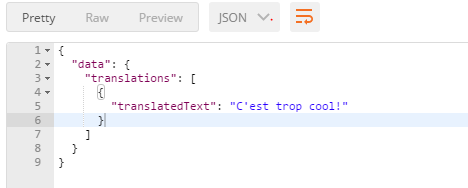
The path for the "translated text" value is:
data/translations/1/translatedText
Don't forget that you need to check first if your request is successful, by checking if you get any response from the server (IsSucessfulRequest property), and if you get a positive response (IsSuccessHttpStatusCode)
Recall the JSON response when an error occurred:
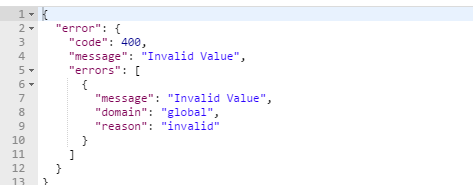
The path to the error message:
error/message
Here is the code that extracts the translated text from the JSON response:
* Check if the server returned a response
If (#HttpRequest.Response.IsSuccessfulRequest)
* Feed the HTTP Response to the JsonReader object
#Reader.SetSourceHttpResponse Httpresponse(#HttpRequest.Response)
* Check if we get a positive response from the server
If (#HttpRequest.Response.IsSuccessHttpStatusCode)
* Get the result (translated) text
          #TranslatedText := #Reader.ReadStringWithPath( 'data/translations/1/translatedText' )
          #OK := True
       Else
* Get the error code & error message from the JSON response
          #ErrorCode := #Reader.ReadStringWithPath( 'error/code' )
          #ErrorMessage := #Reader.ReadStringWithPath( 'error/message' )
          #OK := False
      Endif
    Else
* We didn't get any response from the server
* Get the transport error from the Response object
      #OK := False
      #ErrorCode := #HttpRequest.Response.ErrorCode
      #ErrorMessage := #HttpRequest.Response.ErrorMessage
     Endif