In this step, you will add an Edit Note push button above the NotesList.
The Edit Note button Click event will:
- Process all entries in the NotesList
- Select the first entry with a NotesList.CurrentItem.Checked property of Checked.
- Invoke the NoteEditor.Show method, passing Employee Note GUID, Employee ID and iiiFullName
- Handle the SkillEditor.uCompleted event, by locating and updating the changed entry in NotesList.
1. Switch to the Update from a List web page and select the Design tab.
2. Drag and drop the Note Editor Pop Up component onto column 2 of the layout table.
a. Use the Bring to Front button on the Home ribbon to bring the Note Editor to the front.
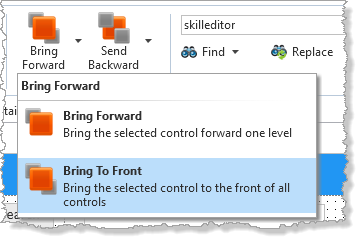
b. Using the Details tab, change the Note Editor Name to NoteEditor.
3. Add a push button to row 4, column 2, above the NotesList.
a. Give it an Alignment of Top Right.
b. Change its Top margin to 20 and its margin Right to 20.
c. Change its Caption to Edit Note and give it an Image of xImageDetails16. Adjust the width of the button as necessary.
d. Change its Name to Button_EditNote and create a Click event.
4. Complete the Button_EditNote.Click event routine, based on the following:
Select all NotesList entries
For each entry:
If NotesList.CurrentItem.Checked is checked
Invoke the NoteEditor.Show method, passing EmployeeNoteGUID, Employee ID and iiiFullName
Set NotesList.CurrentItem.Checked to Unchecked.
Leave the Selectlist loop
End IF
End select
Your code should look like the following:
Evtroutine Handling(#Button_EditNote.Click) Selectlist Named(#NotesList) If (#NotesList.CurrentItem.Checked = checked) #NoteEditor.show( #xEmployeeNoteGUID #xEmployeeIdentification #iiiFullName ) #NotesList.CurrentItem.Checked := Unchecked Leave Endif Endselect Endroutine
5. Create an event routine for NoteEditor.uCompleted event, receiving all parameters.
Evtroutine Handling(#NoteEditor.UCompleted) Noteguid(#NoteGUID) Employeeid(#EmployeeID) Employeenote(#EmployeeNote)
Endroutine
6. Complete the NoteEditor.uCompleted event routine, based on the following:
Locate entry in NotesList where xEmployeeNoteGUID = NoteGUID
Assign xEmployeeNote to EmployeeNote
Assign xEmployeeNoteCreateUpdate to current date and time
Update entry in NotesList
Your code should look like the following:
Evtroutine Handling(#NoteEditor.UCompleted) Noteguid(#NoteGUID) Employeeid(#EmployeeID) Employeenote(#EmployeeNote) Loc_Entry In_List(#NotesList) Where(#xEmployeeNoteGUID = #NoteGUID) #xEmployeeNote := #EmployeeNote #xEmployeeNoteCreateUpdate := #xEmployeeNoteCreateUpdate.now Upd_Entry In_List(#NotesList)
Endroutine
7. Compile and test your Update from a List web page.
- Search for and select an employee with Notes (most employees have one or more Notes records).
- Check a checkbox in the NotesList and click the Edit Note button.
- The Note Editor should be displayed below in the center of the web page.
- Replace the note with your own text and click Save.
- The Note Editor Popup should close, and the NotesList entry in the web page should be updated when the NoteEditor signals its uCompleted event.