The Java Service Manager Console allows you to perform administration tasks on the java service manager (JSM) instance associated with this installation of LANSA Composer. When used from within LANSA Composer, this includes the ability to stop and restart the JSM.
To access the Java Service Manager Console, expand Operations in the Navigator and select Java Service Manager Console. If the Java Service Manager Console fails to display, this is typically for one of the following reasons:
- The JSM instance is not running. If this is the case, start the JSM instance and retry.
- The URL for the console for JSM instance is not correct. Check and correct the applicable system setting if necessary. Refer to System Settings for further information.
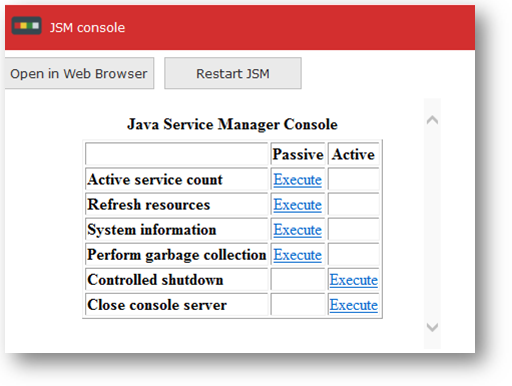
The Restart JSM button stops and restarts the java service manager (JSM). It may sometimes be necessary to stop and restart the JSM if new LANSA Integrator solutions or other new or revised Java code is deployed to LANSA Integrator or if certain changes are made to LANSA Integrator configuration.
When you click the Restart JSM button, a message box asks you to confirm the request before proceeding. This is because stopping and restarting the JSM may interfere with other applications, especially in a production environment. If you are sure you wish to proceed, click Yes.
For more information about the Java Service Manager Console, refer to the Java Service Manager Console in the LANSA Integrator Guide.