The LANSA Composer Server Setup wizard shows a selection of settings for the LANSA Composer Server database.
The choices in this step relate to the database that you created in Create a Database for a New LANSA Composer installation.
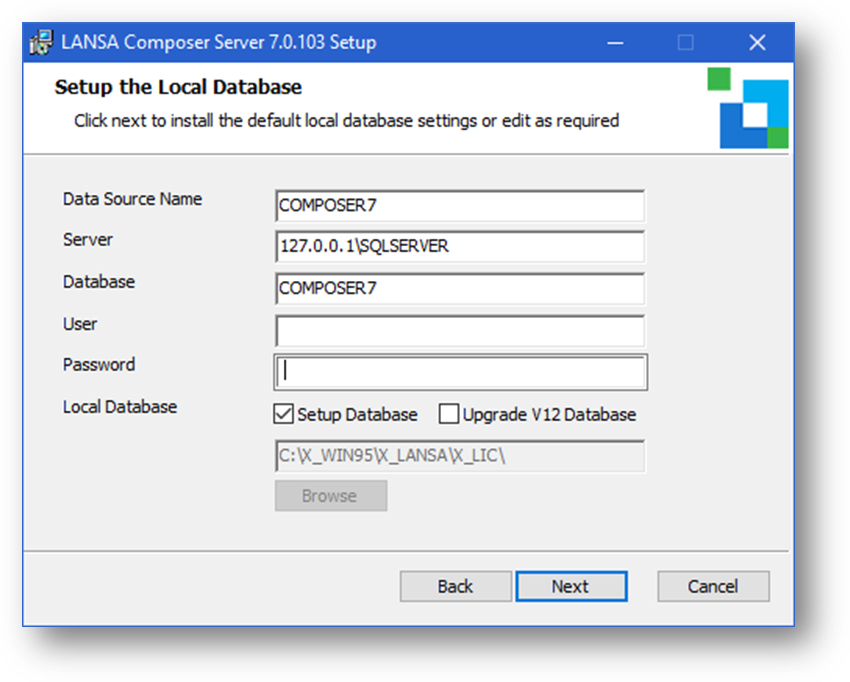
Complete your choices in accordance with the following:
Data Source Name: Specifies the data source name (DSN) that LANSA Composer will use to access the database. The LANSA Composer Server Setup wizard will create the DSN when you proceed with the installation.
The data source name must be unique amongst DSN names on this Windows server, must not exceed 32 characters in length and may not include any blank characters. (If you wish to review existing DSNs that already exist on this computer, you can do so using the ODBC Data Source Administrator program in Windows.)
Server: This is the name that the database server is called on the network. Note, the Server name is not the PC name, or, at least, not just the PC name. As an example, for SQL Server the default name for a database server is in the form "PC Name\Instance Name" - for example, "MY_PC\SQLSERVER".
Database: Specifies the name of the database. (This does not apply for an Oracle database.) This should specify the name of the database that you created in Create a Database for a New LANSA Composer installation.
User and Password: Specifies the user name and password that you wish LANSA Composer Server to use to access the database. You can leave these values blank for a Microsoft SQL Server database in order to use trusted connections.
Setup Database: This option is checked (selected) by default in order to install or upgrade the database tables. You must leave it checked for a successful LANSA Composer Server installation.
Upgrade V12 Database: This option does not apply. Do not check this checkbox.
Upgrade Folder: This option does not apply and it will remain grayed (disabled).
When you have made your choices, click Next and continue with: User Id