The SMTP Server Configuration may be used to identify the SMTP server to be used when an email is sent using the SMTP protocol. Typically you will have a single SMTP Server Configuration that identifies your SMTP server.
An activity named MAIL_SEND is provided to send emails. This standard Activity uses the information in the SMTP Server Configuration to identify which email server is to be used.
For an example configuration connecting to Microsoft's Office365 SMTP server, refer to:
Connecting to a Microsoft Office365 SMTP Server
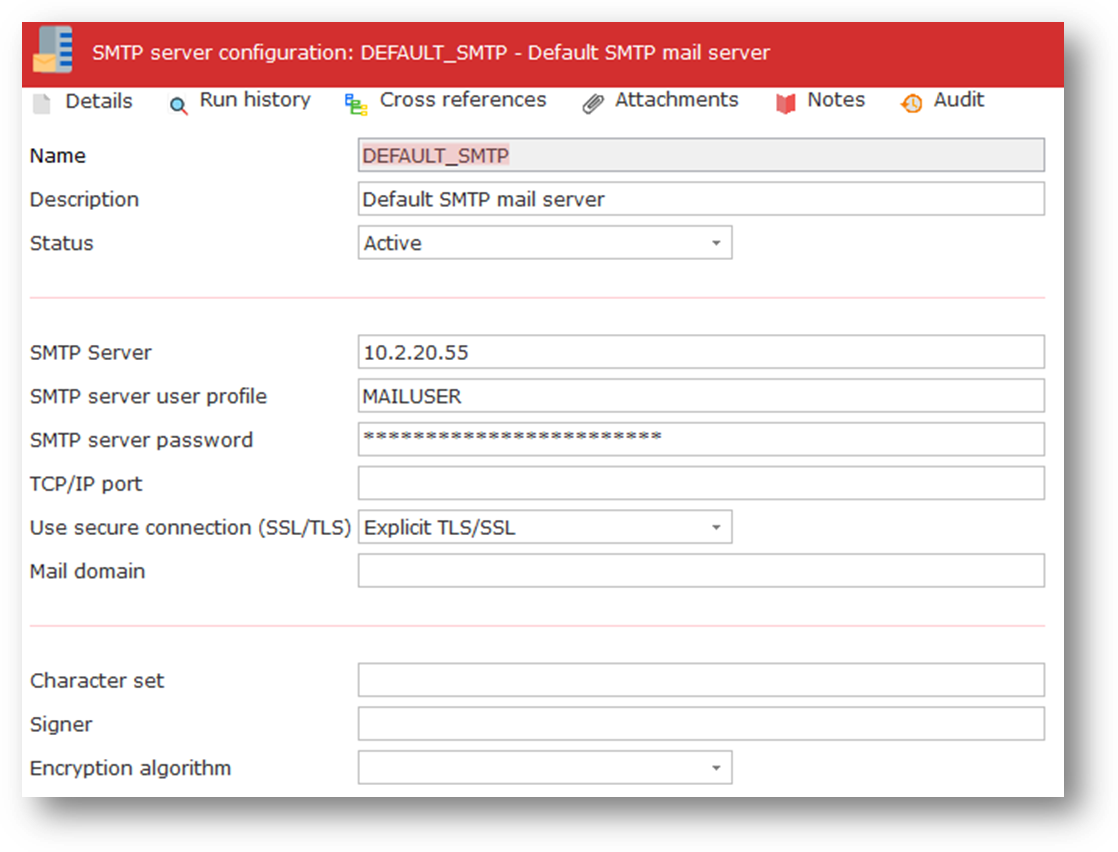
ID | An identifier to uniquely identify this Configuration | |
|---|---|---|
Description | This should describe the Configuration. | |
Status | Active or Inactive. Configurations cannot be used in a processing sequence while they are in inactive status – supplied activities will end in error if they attempt to use a configuration that has inactive status. | |
SMTP Server | This is the IP address or domain name of the SMTP mail server. This value must be provided. | |
SMTP server user profile | This should specify the user profile name used to login to the SMTP server. | |
SMTP server password | This should specify the password used for login to the SMTP server. | |
TCP/IP port | This value is optional. The default value is port 25 (or 465 for a secure connection using Implicit SSL/TLS). | |
Use secure connection (SSL/TLS) | Specifies whether to use a secure connection to the specified SMTP server. You can choose one of the following: | |
Mail Domain | This value is optional and may contain the mail domain issued by the SMTP HELO subcommand. | |
Character set | This value is optional. It may contain the character set set encoding of the body text and subject. | |
Signer | This value is optional. It consists of 2 components, name:password. These values are used as keyword to identify entries in the LANSA Integrator SMTPMailService properties file. The X509 certificate file is obtained form the signer.certificate.{name} property. The PKCS8 keystore file is obtained from the signer.keystore.{name} property. The keystore password is used for the password. Refer to documentation of the SEND command of the SMTPMailService in the LANSA Integrator Guide for further information on the configuration and use of this value. | |
Encryption algorithm | This value is optional. It may contain *DES, *DES-EDE3, *RC2- 40, *RC2S-64 or *RC2-128. Refer to documentation of the SEND command of the SMTPMailService in the LANSA Integrator Guide for further information on the configuration and use of this value. | |
Connecting to a Microsoft Office365 SMTP Server
More and more organizations are using cloud-based mail services such as Microsoft's Office 365. The following shows an example of SMTP server settings that were found to work satisfactorily for sending mail through the Microsoft Office365 SMTP server:
(You should specify your own assigned user name and password for connecting to Office365.)