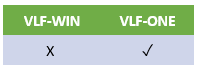
You can specify the size of the screen on which an instance list column is shown:
| Size | Device |
|---|---|
On small screen | Phone |
On medium screen | Tablet |
On large screen | Desktop |
For example, if you want an instance list column to be invisible when the Framework application is being viewed on a small screen, like a mobile phone, you can uncheck the On small screen (Phone) option.
The default for the property is allowed in all screen sizes.
The sizes are evaluated based on screen width:
- Small (Screen width less than or equal to 640 pixels)
- Medium (Screen width less than or equal to 1007 pixels)
- Large (Screen width greater than 1007 pixels)
Only applies to standard snap in instance lists (VF_UM040O, VF_UM044O, VF_UM041O, VF_UM043O)
If you are using your own snap in instance list you will need to code your own logic to exclude columns for different screen sizes.